The smart home market is flooded with devices that promise to revolutionize your life, but most of them simply add another app to your phone without touching your utility bill. The truth is that only a small subset of smart home technology is actually designed around energy efficiency, and those are the upgrades worth your money and your attention.
The average American household spends roughly $2,200 per year on energy, according to the U.S. Energy Information Administration. Heating and cooling account for nearly half of that total, with water heating, lighting, and appliances splitting the rest. Smart upgrades that target those big-ticket categories can realistically shave $300 to $600 off your annual bills, with most devices paying for themselves within one to three years.
This guide focuses on five specific upgrades: a smart thermostat, smart power strips, a smart water heater controller, occupancy-based lighting, and a smart irrigation controller. For each one, you will find real installation steps, honest cost estimates, and the actual savings data that backs up the claims. No fluff, no affiliate hype, just the upgrades that earn their keep.
What You’ll Need
Click on an item below to shop for the recommended items for this recipe on Amazon.
As an Amazon Associate, we earn from qualifying purchases.
How to Do It
- Check your utility’s website for smart thermostat rebates before purchasing. Many utilities rebate $25 to $75, and some offer free devices through demand-response programs.
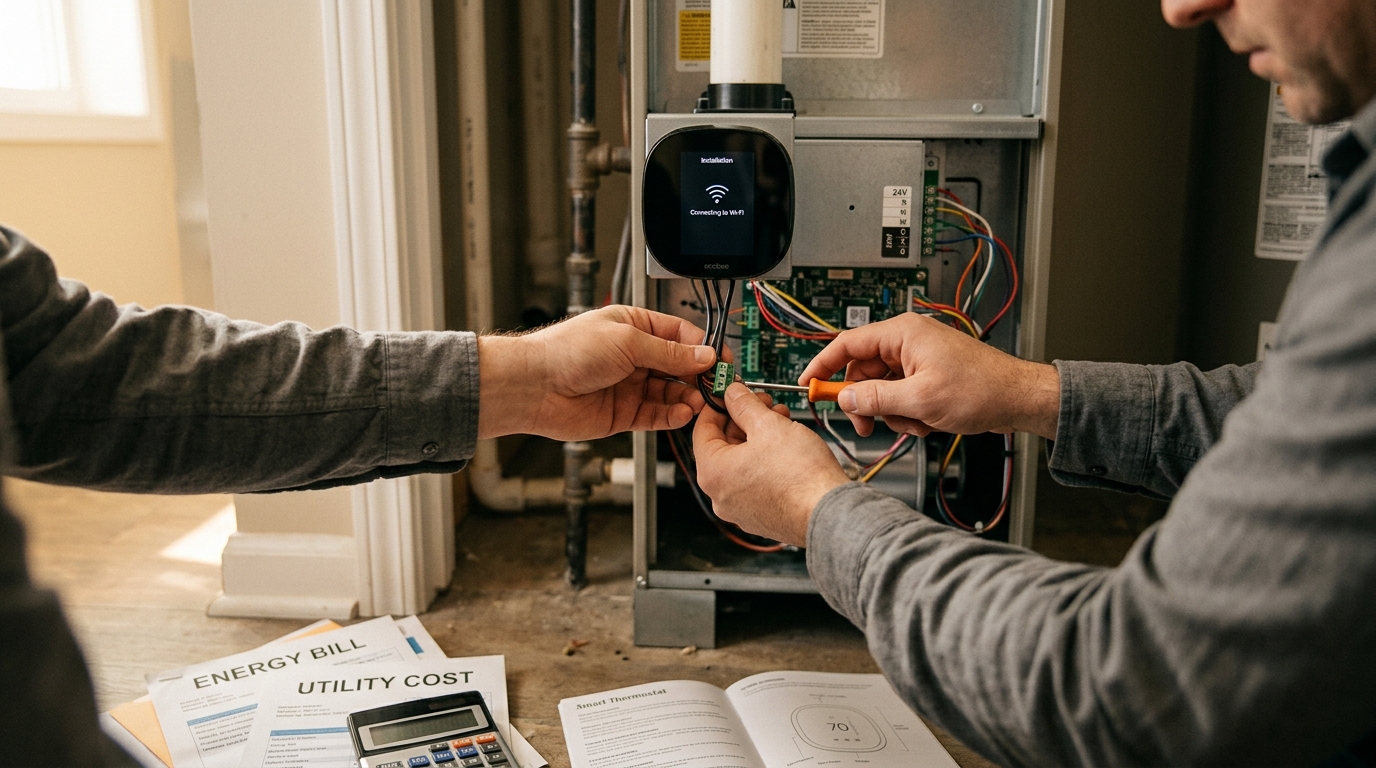
- Turn off power to your existing thermostat at the breaker. Remove the old unit and photograph the wiring before disconnecting anything. Most smart thermostats work with standard 5-wire systems (R, G, Y, W, C).
- Follow your new thermostat’s app-guided installation. Most models walk you through wire identification and connection in under 20 minutes. Restore power and complete the in-app setup including your home’s heating and cooling system type.
- Program at least two setback periods: one for overnight (raise cooling setpoint 4 degrees or lower heating setpoint 8 degrees) and one for your typical away hours on workdays. ENERGY STAR estimates this alone saves 8% on heating and cooling annually.
- Plug a smart power strip into your living room entertainment center. Connect your TV to the master outlet and your streaming devices, gaming console, and sound bar to the switched outlets. When the TV powers off, the strip cuts power to all accessories.
- Add a second smart power strip to your home office, placing your monitor or desktop PC on the master outlet and speakers, desk lamp, and phone charger on the switched outlets.
- Install the smart thermostat and smart power strips as described in the quick fix approach above. These are your starting point for all five upgrades.
- Install a smart water heater controller compatible with your tank-style electric water heater. Turn off the breaker to the water heater, remove the access panel, and follow the manufacturer’s wiring diagram to connect the controller. Set a schedule that heats water before your morning routine and again before dinner, then drops to vacation mode overnight. This approach saves $50 to $100 per year on a typical 50-gallon electric unit.
- Replace the switches in your three most-used rooms with smart occupancy sensor switches. Turn off the breaker, swap the old switch for the smart switch (most require a neutral wire, so confirm before purchasing), and restore power. Set the auto-off timer for 5 to 10 minutes of vacancy. Lighting accounts for 10 to 15% of home electricity use, and automatic shutoffs in frequently forgotten rooms like bathrooms and laundry rooms deliver consistent savings.
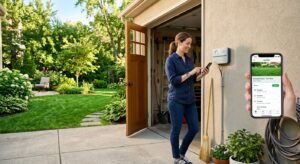
- Install a smart irrigation controller in place of your existing timer-based controller. Turn off the main irrigation valve. Mount the new controller in the same location, match each zone wire to the corresponding terminal (most are labeled numerically), and connect to your Wi-Fi. Input your soil type, sun exposure, and plant types into the app. The controller will then use local weather data to skip or shorten cycles automatically.
- Download your utility’s app or enroll in a time-of-use rate plan if available. Program your smart thermostat, water heater controller, and dishwasher (if Wi-Fi enabled) to avoid peak rate hours, typically 4 to 9 PM on weekdays. Shifting high-draw appliance use to off-peak hours can save an additional $50 to $150 per year on time-of-use plans.
- After 30 days, review the energy reports in each device’s app. Identify which zones or appliances are still drawing unexpectedly high loads and adjust schedules accordingly. Most smart thermostats show monthly comparisons that help you benchmark savings over time.
Why It Works: The Benefits
A smart thermostat with proper scheduling reduces HVAC energy use by 8 to 15% annually. For a home spending $900 per year on heating and cooling, that translates to $72 to $135 in savings every year.
Smart power strips targeting entertainment centers and home offices can cut standby electricity waste by $100 to $200 per year depending on how many devices are connected and how often they sit idle.
Smart irrigation controllers save an average of 8,000 gallons per year according to EPA WaterSense data, cutting outdoor water bills by 30 to 50%. A smart water heater controller adds another $50 to $100 in annual savings by eliminating unnecessary heating cycles.
Unlike manual conservation habits that depend on discipline, these devices operate on schedules and sensors. Once configured, they capture savings consistently without requiring the homeowner to remember to adjust anything.
Many utilities offer rebates of $25 to $100 for ENERGY STAR certified smart thermostats and WaterSense irrigation controllers, effectively cutting your payback period by 20 to 40%.
💰 Savings Impact by Action
Automated scheduling and setbacks reduce annual heating and cooling energy use by 8 to 15%, with ENERGY STAR citing an average of 8% on heating and 15% on cooling.
Smart power strips eliminate standby draw from entertainment and office electronics, cutting that portion of electricity use by up to 10% of total household consumption.
EPA WaterSense data shows smart weather-based irrigation controllers reduce outdoor water use by 30 to 50% compared to fixed-schedule timers.
Automatic shutoffs via occupancy sensor switches reduce lighting energy use in targeted rooms by 25 to 45% depending on how consistently lights were left on previously.
Scheduling a tank water heater to avoid overnight and midday heating cycles reduces standby heat loss and cuts water heating energy use by 5 to 12% annually.
🏠 Key Concepts Explained
The Science Behind It
The physics behind smart home savings comes down to one principle: energy systems waste the most when they run on fixed schedules that ignore actual conditions. A traditional thermostat holds a constant setpoint regardless of whether anyone is home. A fixed irrigation timer runs the same cycle whether it rained two inches last night or not. Smart devices break that fixed-schedule model by substituting real-time data, whether from occupancy sensors, weather APIs, or utility pricing signals, for the assumption that conditions are always the same.
Thermal setback works because the rate of heat transfer between your home and the outdoors is proportional to the temperature difference between the two environments. This is a direct application of Fourier’s Law of heat conduction. When you allow your home to drift 4 to 8 degrees toward the outdoor temperature during unoccupied hours, you reduce that driving temperature differential and therefore the rate at which your HVAC system must work to maintain it. The savings are not dramatic per degree, roughly 1 to 3%, but automated setbacks applied consistently across 8 to 10 hours per day add up to 8 to 15% annual reductions without any sacrifice in comfort during occupied hours.
Phantom load elimination operates on a simpler principle: electricity consumed by a device in standby mode is pure waste with zero useful output. The Lawrence Berkeley National Laboratory measured standby power draw across hundreds of devices and found that the average American home has 40 or more always-on devices contributing a combined 50 to 100 watts of continuous draw. Over a year, that is 440 to 876 kilowatt-hours consumed while delivering no benefit whatsoever. Smart power strips interrupt that draw at the circuit level, which is more reliable than depending on individual device power management settings that vary widely in effectiveness.
Frequently Asked Questions
▼ My smart thermostat says it has no C-wire. Can I still install it?
Many older homes lack a dedicated common wire, but most modern smart thermostats offer a workaround. Ecobee includes a Power Extender Kit that uses your existing wires to create a virtual C-wire connection. Nest’s Learning Thermostat uses a battery-based system that charges intermittently over the heating or cooling wire. Check the compatibility tool on your thermostat’s website, and if your system has a spare wire in the thermostat cable bundle, you can often repurpose it as a C-wire with a simple connection at the furnace control board.
▼ I installed a smart thermostat but my bills went up. What went wrong?
The most common culprit is an incorrect system type configuration in the app setup. If you told the thermostat you have a heat pump but you actually have a gas furnace, or vice versa, it may be running emergency heat or cycling inefficiently. Open the thermostat’s equipment settings and verify the system type, stage count, and reversing valve setting if applicable. The second most common issue is a schedule that never actually lowers the setpoint because it was set up but not activated. Confirm that the away and sleep modes are both enabled and that the setback temperatures are at least 4 degrees from your comfort setpoint.
▼ Can renters install any of these upgrades without landlord permission?
Smart power strips require no permission and deliver immediate standby savings. Smart bulbs with occupancy sensing built in can replace standard bulbs without any wiring and are fully reversible. A smart thermostat falls in a gray area because it involves disconnecting the existing unit, though most landlords approve the swap if you keep the original thermostat to reinstall at move-out. Water heater controllers and irrigation systems almost always require landlord approval since they involve the building’s fixed infrastructure. Always get permission in writing before any wiring work.
▼ How long until I actually see savings on my utility bill?
Smart thermostat savings typically appear within the first full billing cycle, usually 30 days, because HVAC is your largest energy draw and setback scheduling takes effect immediately. Smart power strip savings are smaller and may take two to three billing cycles before they are clearly distinguishable from normal monthly variation. Irrigation savings appear on your water bill, which in many areas is billed quarterly, so allow 60 to 90 days. Review the energy reports inside each device’s own app for week-by-week feedback before your utility bill arrives.
▼ What if my home is older than 30 years and has outdated wiring?
Older homes often lack the neutral wire that most smart switches require, and may have aluminum wiring or two-wire thermostat cables that limit your options. For thermostats, focus on models that work without a C-wire or use a Power Extender Kit. For smart switches, look for no-neutral smart switch models designed specifically for older wiring, such as Lutron Caseta, which uses a different communication protocol that does not need a neutral. For any home with aluminum branch circuit wiring (common in homes built between 1965 and 1973), have a licensed electrician inspect before adding any new devices to those circuits.
Quick Tips
- Enable your smart thermostat’s geofencing feature so it automatically shifts to away mode when everyone leaves and begins recovery before you return, capturing savings without any manual input.
- Set your smart water heater schedule to heat a full tank 45 minutes before your household’s typical morning shower window, then again 30 minutes before your evening hot water demand peak. This eliminates mid-shower reheating cycles.
- Buy smart switches with integrated occupancy sensors rather than separate plug-in motion sensor accessories. Hardwired switches control the full circuit including overhead lights, which plug-in sensors cannot reach.
- Check whether your utility offers a free home energy audit. Auditors often provide programmable thermostats, LED bulbs, and smart power strips at no charge as part of the program, dramatically cutting your upgrade investment.
Variations for Your Situation
- Apartment/Rental: Renters should start with smart power strips and smart bulbs, both of which are fully portable and require zero installation. A smart plug with energy monitoring (typically $15 to $25) can be placed behind a window AC unit or electric space heater to schedule operation and track consumption. If your landlord allows thermostat swaps, a battery-powered smart thermostat like the Honeywell T6 Pro requires no C-wire and is reversible at move-out. Total investment can stay under $100 with $150 to $250 in annual savings.
- Tight Budget (under $50): Prioritize a single smart power strip ($25 to $35) for your entertainment center first, as it requires no installation skill and delivers guaranteed savings on your existing standby waste. Pair it with a free smart thermostat through your utility’s rebate program. If no rebate is available, a basic programmable thermostat (not smart, but scheduled) costs $25 and delivers nearly the same setback savings as a smart model without the app features. These two steps alone can save $120 to $200 per year.
- Older Home (pre-1980): Homes built before 1980 typically have more air leakage, lower insulation levels, and wiring that may not support standard smart devices. In these homes, the smart thermostat delivers proportionally higher savings because the HVAC system is working harder to begin with, but confirm C-wire availability and system compatibility before purchasing. Prioritize Lutron Caseta smart switches for lighting because they use a neutral-free design that works with virtually all older wiring configurations. Also consider that your greatest efficiency gains may come from air sealing and insulation upgrades before investing heavily in smart controls, since automating an inefficient envelope has a lower ceiling on savings.