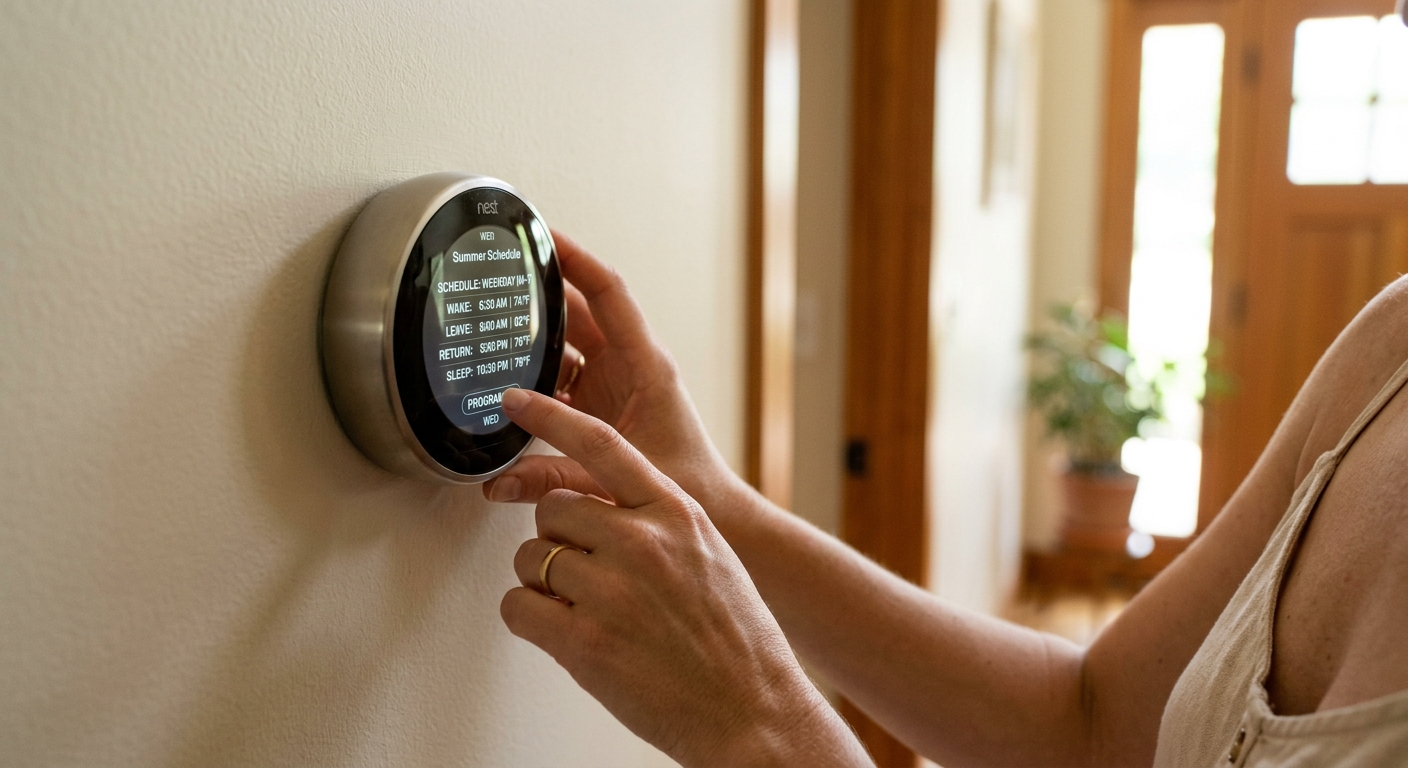
Your air conditioner is probably the single biggest energy draw in your home during summer, accounting for nearly half of your total electricity bill in warm climates. Yet most households run their AC at the same temperature 24 hours a day, paying full price to cool an empty house while everyone is at work or school. That habit costs the average American homeowner between $150 and $300 in unnecessary cooling costs every summer.
The fix is straightforward: program your thermostat to follow your real schedule rather than a generic one. That means letting the house warm up a bit while you are away, pre-cooling before you return, and finding a comfortable sleeping setpoint that does not run the compressor all night. Done right, this one change delivers 10 to 15% annual savings according to ENERGY STAR data, with no upfront cost if you already have a programmable or smart thermostat.
This guide walks you through two approaches, from a quick 15-minute reprogramming of whatever thermostat you already own, to setting up a smart thermostat with geofencing and occupancy learning for hands-free optimization. You will get real temperature targets, scheduling logic that accounts for humidity, and tips for households with irregular routines.
What You’ll Need
Click on an item below to shop for the recommended items for this recipe on Amazon.
As an Amazon Associate, we earn from qualifying purchases.
How to Do It
- Write down your real weekday schedule: what time the first person leaves, what time the last person returns, and what time you typically go to bed. Be honest about actual times, not ideal ones.
- Set your away period setpoint to 82 degrees (78 to 83 degrees in humid climates like the Southeast, 85 degrees is acceptable in dry climates like the Southwest).
- Set your pre-arrival cool-down to begin 30 minutes before you return home. If you get home at 5:30 PM, schedule the return to your comfort setpoint (typically 74 to 76 degrees) at 5:00 PM.
- Set your occupied comfort setpoint for evenings between 74 and 76 degrees based on your preference. Each degree lower increases cooling costs by roughly 3 to 5%.
- Set a sleep setpoint of 76 to 78 degrees starting 30 minutes after your typical bedtime. Most people sleep comfortably at 65 to 72 degrees ambient, and ceiling fan use can offset a higher thermostat setpoint by 4 degrees.
- Program a separate weekend schedule if your Saturday and Sunday routines differ from weekdays. Many families are home all day on weekends, so the away setback may not apply.
- Confirm compatibility before purchasing: take a photo of your existing thermostat wiring. Most smart thermostats require a common wire (C-wire) for continuous power. Many utilities and manufacturers offer free C-wire adapters or compatibility checkers on their websites.
- Turn off power to your HVAC system at the breaker before removing the old thermostat. Label each wire with the terminal it was connected to using the included stickers or masking tape.
- Mount the new thermostat base, connect the labeled wires to the corresponding terminals, attach the display unit, and restore power. Most installs take 20 to 40 minutes.
- During the initial setup, enter your actual weekday and weekend schedules using the app or display wizard. Enable the geofencing feature if available, this uses your phone’s location to trigger setbacks automatically when you leave and pre-cooling when you are on your way home.
- Set your energy-saving preferences: configure away temperature at 82 degrees, home comfort temperature at 74 to 76 degrees, and sleep temperature at 76 to 78 degrees as a starting baseline.
- After two weeks, review the energy report in the app to see which schedule periods are running the longest. Adjust your away setpoint or pre-arrival timing based on actual performance data rather than guesses.
Why It Works: The Benefits
ENERGY STAR data shows that properly programmed setbacks save an average of 10 to 15% annually on heating and cooling combined. For a household spending $300 per month on electricity in peak summer, that translates to $30 to $45 per month in direct savings.
Cutting daily runtime by 2 to 4 hours through smart scheduling reduces compressor starts per season, which is the most mechanically stressful part of AC operation. Fewer starts extend compressor life and reduce the likelihood of refrigerant and capacitor failures.
A schedule tuned to your actual arrival and sleep times means the house is at your preferred temperature exactly when you need it, rather than the reactive discomfort of returning to an overheated home or waking up sweaty at 3 AM because the overnight setpoint was too high.
In areas where utilities charge time-of-use rates, pre-cooling your home before 4 PM and reducing AC use during peak hours (typically 4 to 9 PM) can reduce demand charges by 10 to 20% on top of the standard energy savings.
Unlike insulation or window upgrades, reprogramming an existing thermostat costs nothing and takes 15 minutes. The savings show up on your very next billing cycle.
💰 Savings Impact by Action
Raising the cooling setpoint by 7 to 10 degrees during unoccupied hours saves approximately 10 to 15% on cooling costs for those periods based on DOE data.
Setting a higher overnight cooling temperature of 76 to 78 degrees instead of 74 degrees reduces overnight compressor runtime by 20 to 30%, saving roughly 8% on total cooling.
Smart thermostats with geofencing and learning algorithms deliver an average of 15% savings versus a constant setpoint according to ENERGY STAR and independent utility studies.
Using ceiling fans to raise the comfortable thermostat setpoint by 4 degrees reduces AC energy use by approximately 10% with no reduction in perceived comfort.
🏠 Key Concepts Explained
The Science Behind It
The physics behind thermostat scheduling comes down to the relationship between indoor-outdoor temperature difference and heat transfer rate. Your home gains heat from the outside at a rate proportional to the temperature difference across the walls, ceiling, and windows. When your interior is at 82 degrees and the outside is 95 degrees, heat flows in at a much slower rate than when your interior is at 74 degrees and the outside is 95 degrees. Keeping the house warmer while you are away dramatically reduces the rate of heat infiltration, which means your AC does far less work when it finally runs to restore comfort.
Humidity is the critical complicating factor in warm, moist climates. Relative humidity rises as temperature increases indoors, because warmer air holds more moisture and your AC is no longer running to remove it. Above 60% relative humidity, the evaporative cooling effect of perspiration becomes less effective, making 80 degrees feel genuinely uncomfortable. This is why a dry climate like Phoenix can tolerate away setpoints of 85 degrees while a humid climate like Houston should stay at or below 82 to 83 degrees. The AC dehumidifies as it cools, so moderate runtimes are necessary to keep moisture in check even when no one is home.
Smart thermostats that use occupancy sensors and machine learning improve on manual scheduling by adapting to real patterns rather than assumed ones. They track when you actually leave and arrive, learn how long your specific home takes to cool down from a setback (called thermal recovery time), and adjust the pre-cool trigger accordingly. Over a full summer, this adaptive scheduling consistently outperforms a fixed programmed schedule by an additional 3 to 5% in energy savings, because it accounts for the days when you leave early, come home late, or stay home unexpectedly.
Frequently Asked Questions
▼ Why does my house still feel hot when I get home even though I scheduled the AC to start before I arrive?
Your pre-cool lead time is probably too short. On very hot days, a house that has warmed to 83 degrees may take 45 to 60 minutes to reach 75 degrees depending on your home’s insulation and your AC’s capacity. Try moving your pre-cool start time back by 15-minute increments until you arrive to a comfortable home. Also check that your away setpoint is not above 84 degrees, which creates more thermal mass heat to remove.
▼ My programmable thermostat keeps reverting to the default settings. What is happening?
Most programmable thermostats lose their schedule when the batteries die or are removed, resetting to the factory default. Replace the batteries with fresh alkaline cells and reprogram the schedule. Going forward, replace thermostat batteries every 12 months in the fall before heating season as a maintenance habit.
▼ How long before I actually see a difference on my electricity bill?
You should see a measurable difference on your very next monthly bill after programming a proper schedule, as long as the billing period includes at least two to three weeks of the new schedule running. Savings of 10 to 15% over the unscheduled baseline should be visible, though comparing summer-to-summer is more meaningful than month-to-month because outdoor temperatures vary.
▼ Our household schedule changes week to week. Is thermostat scheduling still worth doing?
Yes, but a smart thermostat with geofencing is a much better fit than a fixed-program thermostat for irregular households. Geofencing adjusts setbacks based on when phones actually leave and return rather than a preset time, capturing savings on irregular days automatically. Ecobee and Google Nest both handle variable routines well. If you prefer manual control, get in the habit of using the vacation or away hold feature on days when your schedule deviates significantly.
▼ Will programming setbacks hurt my AC unit or make it work harder?
No. Modern AC systems are designed to handle temperature recovery after a setback without damage. The concern that running harder to recover from a setback negates the savings is a myth that has been tested and disproved by DOE research. The energy saved during the setback period always outweighs the brief extra runtime during recovery, resulting in net savings every time.
Quick Tips
- Use a ceiling fan in occupied rooms to offset your thermostat setpoint by up to 4 degrees, which lets you set the AC 4 degrees higher with the same perceived comfort level.
- Block direct afternoon sun with blinds or curtains on west-facing windows between 2 PM and 6 PM. This simple step can reduce cooling load by 10 to 15% and make your schedule work with less AC runtime.
- On mild days when outdoor temperatures stay below 75 degrees overnight, use the thermostat fan setting to circulate cool outdoor air instead of running the compressor. Most programmable thermostats allow you to run the fan independently.
- If you work from home some days but not others, use your smart thermostat app to manually override the away setback on days you stay home rather than disabling the whole schedule. This preserves savings on the days when you do leave.
Variations for Your Situation
- Apartment/Rental: If your apartment has a basic non-programmable thermostat, ask your building manager about replacing it with a smart thermostat at your expense since most landlords allow it for compatible systems. Alternatively, a plug-in smart thermostat adapter like the Mysa or Sensibo works with mini-split and window AC units without any wiring, costs $50 to $100, and is fully renter-safe. Focus on consistent manual habits if hardware changes are not allowed: raise the setpoint to 80 to 82 degrees every time you leave and lower it 30 minutes before you return via a phone reminder.
- Tight Budget (under $50): Skip the smart thermostat and focus on perfecting the schedule on whatever programmable thermostat you already have. The full 10 to 15% savings is available with zero hardware cost. If your current thermostat is a non-programmable manual unit, a basic 7-day programmable thermostat costs $20 to $35 at any hardware store, installs in 20 minutes, and pays for itself in the first month of summer. Pair your schedule with free measures like closing blinds on west-facing windows and using ceiling fans to offset the setpoint.
- Older Home (pre-1980): Older homes typically have higher air leakage rates and less insulation, which means the house warms up faster during setbacks and takes longer to recover. Set your away setpoint more conservatively at 80 to 81 degrees rather than 83 to 85 degrees to avoid humidity problems and long recovery times. Consider adding attic insulation to R-38 before relying heavily on thermostat scheduling, since insulation improvements reduce the rate of heat gain and make any schedule significantly more effective. Pre-1980 homes often have two-wire thermostat systems without a C-wire, so verify compatibility carefully before purchasing a smart thermostat.