Your home security system runs every hour of every day, even when nothing is happening. That always-on nature means it shows up on your electricity bill whether you notice it or not. A basic wired system with a central panel, a few door sensors, and a keypad typically draws between 15 and 30 watts continuously, adding roughly $16 to $32 per year at the U.S. average electricity rate of around 13 cents per kWh. Add cameras, sirens, motion detectors, and a cellular communicator, and that number can climb to $50 to $100 or more annually.
The bigger question most homeowners never ask is whether their current setup is optimized. Older systems with transformer-based power supplies waste energy as heat. Indoor cameras running at full resolution 24/7 use far more power than the same cameras set to motion-triggered recording. And backup batteries that are past their prime can actually increase standby draw as the charger works harder to maintain a charge that never holds. Small inefficiencies compound into real dollars over time.
This post covers exactly how much energy different security components use, which components are worth the cost versus which are energy hogs with limited value, and two practical approaches you can take today, from a zero-cost audit to a smarter equipment upgrade, to cut your system’s energy use without sacrificing protection.
What You’ll Need
Click on an item below to shop for the recommended items for this recipe on Amazon.
As an Amazon Associate, we earn from qualifying purchases.
How to Do It
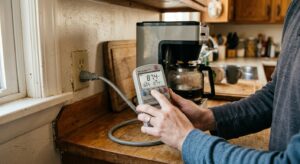
- Plug a smart plug with energy monitoring (such as a Kasa EP25 or similar) into the outlet powering your security panel transformer and record the wattage. Most panels draw 15 to 30 watts; anything above 35 watts warrants investigation.
- Log into your camera system’s app or web interface and switch all indoor cameras from continuous recording to motion-triggered recording. This single setting change can cut camera energy use by 50 to 70%.
- Check the manufacture date on your backup battery, usually a label on the battery itself inside the panel. If it is more than 4 years old, plan to replace it. A failing battery increases charger draw and can trigger false low-battery alerts.
- Identify any cameras pointed at low-traffic areas where they have rarely if ever captured meaningful footage. Disabling or repositioning these eliminates unnecessary standby load without reducing your actual coverage.
- Review your monitoring plan and app settings to confirm you are not storing 30 days of continuous cloud footage when 7 days of motion-triggered clips would meet your real needs. Cloud storage tiers with continuous recording push cameras to record at higher sustained rates.
- Order a replacement sealed lead-acid battery matched to your panel’s voltage and amp-hour rating (typically 12V 4Ah or 12V 7Ah, printed on the existing battery). Expect to pay $15 to $35. Replacement every 3 to 5 years keeps the charger circuit operating efficiently.
- Disconnect AC power to the panel, then swap the old battery for the new one, observing correct polarity (red to positive, black to negative). Restore power and confirm the panel shows a healthy battery status within a few minutes.
- If your panel uses a transformer more than 10 years old, replace it with a UL-listed energy-efficient switching power supply rated for your panel’s voltage and current requirements. Switching supplies waste less than 10% of energy as heat versus 20 to 40% for older linear transformers.
- Install a smart plug with energy monitoring on the outlet powering your panel. Set an energy alert if draw exceeds your established baseline by more than 5 watts, which can flag a failing battery or component before it becomes a problem.
- For any wired cameras, check that PoE (Power over Ethernet) switches powering them have energy-efficient 802.3az (EEE) support enabled. This reduces power to idle ports by up to 50% and is enabled through the switch’s admin interface.
- Add a small label inside your panel door with the battery installation date and model number so future replacements take minutes to source and install correctly.
Why It Works: The Benefits
Optimizing a mid-size security system through smarter settings and updated equipment can reduce its annual electricity cost from around $80 down to $40 to $50, saving $30 to $40 per year with zero reduction in protection.
Replacing aging backup batteries on schedule and ensuring proper power supply ventilation reduces heat stress on electronics, which is the leading cause of premature security panel failure. Panels that run cooler routinely last 10 to 15 years instead of 6 to 8.
A security system drawing 40 watts continuously contributes about 136 BTUs per hour of waste heat. In summer, your AC must remove that heat, adding a small but real cooling load that compounds over the warm months.
Motion-triggered recording not only saves energy but reduces the amount of footage you need to search through after an incident, and it extends the life of storage drives by reducing write cycles by 60 to 70%.
Auditing your system often reveals redundant devices or monitoring subscriptions you are paying for but not fully using. Consolidating to a leaner, more efficient setup can cut both energy and monthly service fees simultaneously.
💰 Savings Impact by Action
Switching cameras from continuous to motion-triggered recording reduces individual camera energy use by 50 to 70% by allowing processors and IR illuminators to idle between events.
Replacing a degraded backup battery eliminates excess charger draw, reducing panel power consumption by roughly 10 to 20% depending on how far the old battery had degraded.
Replacing a linear transformer with a modern switching power supply reduces conversion losses from 20 to 40% down to under 10%, cutting wall draw for the same delivered power.
Removing or disabling cameras covering low-value areas reduces total system load proportionally, with each eliminated camera saving $5 to $15 per year in electricity depending on type.
🏠 Key Concepts Explained
The Science Behind It
Every electrical device in your home converts power into one of two things: useful work or heat. Security systems do very little useful work most of the time since they are simply monitoring for events that rarely occur. The rest of their energy consumption becomes waste heat, which is why the space around an older security panel often feels slightly warm. This continuous heat output is the signature of an inefficient standby load, and in a climate-controlled home, every watt of heat produced inside the envelope must be removed by your air conditioner during summer months.
The efficiency gap between a linear transformer and a modern switching power supply illustrates this well. A linear transformer steps down voltage through electromagnetic induction and then rectifies it to DC, but it draws current proportional to its rated capacity even when the load is light. A switching supply, by contrast, operates at high frequency and only pulls the current actually needed by the load. At a typical security panel draw of 20 watts, a linear transformer might consume 28 to 32 watts from the wall, while a switching supply of equivalent rating pulls only 22 to 23 watts for the same delivered power. That 8 to 10 watt difference, running 8,760 hours per year, adds up to about 70 to 88 kWh annually, or roughly $9 to $11 at average U.S. rates.
Camera energy consumption is governed by the same principles of continuous versus intermittent load. A camera in continuous recording mode maintains its image sensor, processor, and infrared LEDs at full operational capacity all day. In motion-triggered mode, the sensor still watches for movement, but the processor, storage write operations, and often the IR illuminators drop to a low-power idle state between events. Because most residential cameras detect meaningful motion for only 2 to 4 hours out of every 24, motion-triggered mode allows the hardware to idle for 80 to 90% of its operating life, which directly translates to proportional energy savings on those devices.
Frequently Asked Questions
▼ How many watts does a typical home security system use?
A basic system with a panel, keypad, and a few sensors draws roughly 15 to 30 watts continuously from the wall. Adding two to four cameras increases total system draw to 40 to 80 watts depending on camera type and recording mode. Use an energy monitoring plug on your panel outlet for an exact reading in minutes.
▼ My security panel keeps beeping with a low battery warning. Does that mean it’s using more power?
Yes. A degraded battery causes the onboard charger circuit to sustain a higher current draw as it tries to hold a charge the battery can no longer accept fully. Replacing the battery (typically $15 to $35) resolves both the beeping and the excess power consumption. Most sealed lead-acid batteries should be replaced every 3 to 5 years.
▼ Is it safe to turn off my security system at the breaker to save electricity?
Technically possible, but not recommended. Cutting AC power forces the system to run entirely off its backup battery, which drains it within 4 to 24 hours depending on battery capacity and system load. After that, your system has no power and no protection. The energy savings are not worth eliminating your backup power buffer.
▼ Do wireless security systems use less power than wired ones?
Wireless sensors themselves use very little power since they run on coin or AA batteries that last 1 to 5 years per sensor. However, the central hub or panel still needs continuous AC power. The overall system energy use depends more on your cameras and panel efficiency than on whether the sensors are wired or wireless.
▼ How do I know if my cameras are the biggest energy drain in my system?
Plug a smart energy monitor into the power source for your cameras or NVR (network video recorder) separately from your panel and compare readings. Cameras with continuous recording and IR night vision active are frequently responsible for 60 to 70% of total security system energy use in a typical home setup.
Quick Tips
- Check your camera manufacturer’s app for a ‘sensitivity’ setting on motion detection. Tuning it to avoid triggering on swaying trees or passing car headlights reduces unnecessary recording cycles and lowers average power draw.
- If you have an outdoor camera with a built-in spotlight or color night vision feature, consider scheduling that feature to activate only during hours when intrusion is most likely rather than all night.
- Many modern DIY security hubs like Ring Alarm, SimpliSafe, and Abode have energy-efficient designs drawing under 10 watts for the base station, making them significantly cheaper to run than legacy professional-installed panels from the early 2000s.
- Ask your monitoring provider whether a broadband-only plan is available in your area. Removing the cellular radio module, if your system supports it, reduces standby draw and often lowers the monthly monitoring fee by $5 to $10.
Variations for Your Situation
- Apartment/Rental: Renters cannot install hardwired systems but can use self-contained wireless systems like SimpliSafe or Ring Alarm that plug into a standard outlet and use battery-backed wireless sensors. These hubs typically draw only 5 to 12 watts, cost about $5 to $10 per year to run, and require no landlord modification approval. Focus on motion-triggered camera settings and choosing a hub with a modern switching power supply.
- Tight Budget (under $50): Start with a free energy audit using a $15 smart plug with energy monitoring to identify your biggest draw. Then replace only the backup battery if it is more than 4 years old (usually under $35). Switch all cameras to motion-triggered mode at no cost. These three steps alone can reduce your system’s energy use by 25 to 35% without purchasing any new hardware.
- Older Home with Legacy System (pre-2005 installation): Systems installed before 2005 often use linear transformers, older lead-acid batteries near end of life, and panels that draw 35 to 50 watts continuously. In these cases, a full panel and transformer replacement with a modern energy-efficient unit ($150 to $300 installed) can cut standby draw by 30 to 50% and restart the equipment lifecycle. Get a quote from your monitoring provider or a licensed alarm technician, as older wiring may need inspection before new equipment is connected.