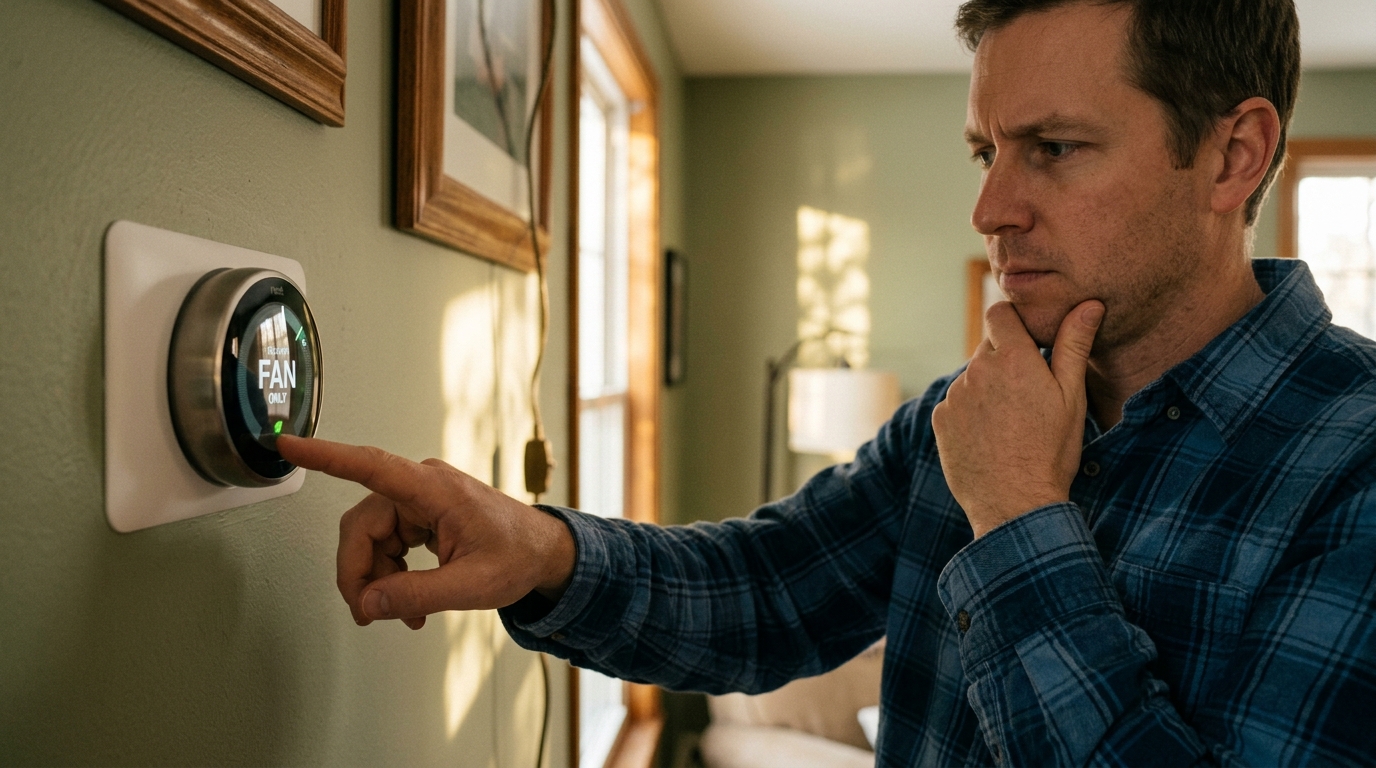
That ‘Fan Only’ or ‘Fan ON’ setting on your thermostat looks harmless enough. You figure keeping air moving will help cool things down, spread the conditioned air around, and maybe give the compressor a break. It sounds logical, but the building science tells a different story. Running your air handler fan continuously, independent of the cooling cycle, is one of the most common and quietly expensive thermostat mistakes homeowners make.
Here is the core problem: your AC system removes humidity from the air as a byproduct of cooling. When refrigerant coils get cold, moisture in the air condenses on them and drains away. But when the fan keeps blowing after the cooling cycle ends, it re-evaporates that moisture right back into your living space. The result is higher indoor humidity, a clammy feeling even at 72 degrees, and an AC that has to work harder and longer to get you back to comfortable.
In this post, you will learn exactly what happens inside your system when you run fan-only mode, how much it is likely costing you each month, and the simple thermostat and scheduling changes that can trim your cooling bills by 10 to 20 percent without sacrificing comfort. Whether you have a basic thermostat or a smart model, there are immediate steps you can take today.
What You’ll Need
Click on an item below to shop for the recommended items for this recipe on Amazon.
As an Amazon Associate, we earn from qualifying purchases.
How to Do It
- Locate the fan setting on your thermostat, usually a switch or menu option labeled ‘Fan: ON / AUTO’ or a dedicated fan icon.
- Switch the fan setting from ‘ON’ to ‘AUTO’. In AUTO mode, the blower only runs when the compressor is actively cooling or heating, then shuts off when the cycle ends.
- Raise your thermostat cooling setpoint by 1 to 2 degrees if humidity currently feels high, since correcting humidity will make the same temperature feel cooler within a day or two.
- Check your thermostat settings again after a thunderstorm or stretch of humid weather to confirm the fan has not been switched back manually by another household member.
- Note your next electricity bill cycle start date so you can compare usage in 30 days and quantify your actual savings.
- Purchase a smart thermostat with humidity sensing capability. Models with this feature include the Ecobee SmartThermostat, Honeywell Home T9, and Nest Thermostat E. Confirm compatibility with your system wiring before buying, especially if you have a heat pump.
- Turn off power to your HVAC system at the breaker and at the thermostat itself before removing the old unit. Take a photo of your existing wiring before disconnecting anything.
- Install the new thermostat following the manufacturer wiring guide. Most installs require connecting 4 to 5 low-voltage wires and take 30 to 60 minutes with a screwdriver and a phone flashlight.
- During setup, navigate to the fan control or humidity settings menu. Set the fan mode to AUTO and enable any ‘humidity control’ or ‘dehumidification mode’ feature, which runs longer cooling cycles at lower fan speed to maximize moisture removal.
- Set a cooling schedule that raises the setpoint by 4 degrees when the home is unoccupied and returns to your comfort temperature 30 minutes before you arrive home. Combined with proper fan settings, this scheduling alone saves an additional 10% on cooling bills.
- After two weeks, review the app’s energy reports to see runtime data and compare to your baseline. Most smart thermostat apps display daily and monthly runtime broken down by heating, cooling, and fan-only operation.
- Ask your HVAC contractor to quote a variable-speed or ECM (electronically commutated motor) air handler as part of any system replacement or upgrade. ECM motors draw only 60 to 120 watts at low speed versus 300 to 600 watts for single-speed motors.
- Request that the contractor program the variable-speed system to run a low-speed ‘comfort circulation’ mode at 20 to 30% of full airflow between cooling cycles. At this low draw, continuous gentle circulation costs roughly $3 to $6 per month rather than $20 to $30.
- Have the technician verify the refrigerant charge and coil airflow are properly matched to the new motor. A mismatched setup negates the efficiency gains of the variable-speed system.
- Confirm the system is set up for ‘dehumidification mode’ if available, which slows the fan during cooling cycles to allow more moisture removal per BTU of cooling energy.
- Request documentation of the equipment SEER2 rating and motor watt draw at various speeds for your records. This data supports any utility rebate applications. Many utilities offer $100 to $400 rebates on qualifying variable-speed systems.
Why It Works: The Benefits
Switching from continuous fan to AUTO mode eliminates unnecessary blower runtime, saving 7 to 14 kWh per day on a typical 3-ton system. At the U.S. average rate of $0.16 per kWh, that is $15 to $25 per month in direct savings during cooling season.
Running the fan on AUTO keeps indoor relative humidity in the 45 to 55% comfort range rather than the 60 to 70% range common with continuous fan use. Lower humidity means you can comfortably set the thermostat 2 to 3 degrees higher, saving an additional 6 to 9% on cooling costs.
Reducing unnecessary blower motor runtime and preventing compressor short cycling can extend the life of both components meaningfully. Blower motors rated for 100,000 hours of operation reach that limit years sooner under continuous use than under AUTO cycling.
This may seem counterintuitive, but filters capture particles more effectively at the higher airflow velocities present during actual cooling cycles than at the slower, inconsistent airflow of a fan-only mode on older single-speed systems.
Keeping indoor humidity below 60% through proper AUTO operation significantly reduces the conditions that allow mold spores to germinate on surfaces. The EPA recommends maintaining indoor humidity below 60% to prevent mold growth.
💰 Savings Impact by Action
Switching from continuous ON to AUTO mode eliminates 12 to 16 hours of unnecessary daily blower runtime, cutting fan energy use by 50 to 65% and total cooling costs by 10 to 20%.
Restoring proper dehumidification allows the thermostat setpoint to be raised 2 to 3 degrees without discomfort, saving approximately 6 to 9% per degree on cooling energy.
Programming setback temperatures of 82 to 85 degrees during unoccupied hours via a smart thermostat saves an additional 10% annually on cooling costs per DOE data.
Upgrading to an ECM variable-speed air handler reduces blower motor energy draw by 60 to 75% compared to single-speed PSC motors, saving 15 to 25% on total HVAC electricity use.
Sealing duct leakage from a typical 25% loss rate down to 10% or less reduces the conditioned air wasted in unconditioned spaces by up to 20% of total cooling energy.
🏠 Key Concepts Explained
The Science Behind It
The efficiency penalty of continuous fan operation comes down to a phase-change physics problem. When warm, humid air passes over your evaporator coil (which is chilled to around 40 to 50 degrees Fahrenheit by refrigerant), two things happen: the air temperature drops (sensible cooling) and water vapor condenses on the coil surface (latent cooling). That condensed water drips into a drain pan and exits the building. Your AC has done real dehumidification work, and the energy for it has already been paid.
When the cooling cycle ends and the compressor shuts off, the coil surface is wet. If the fan continues to run, it drives airflow across that wet coil and the water evaporates right back into the moving air stream. The evaporative cooling that happens on the coil surface slightly chills the air, which may feel pleasant for a few minutes, but it adds moisture back into the space at nearly the same rate it was removed. Studies from the Florida Solar Energy Center found that continuous fan operation can reduce system dehumidification efficiency by 25 to 50% in humid climates, meaning the AC must run proportionally more cooling cycles to achieve the same indoor humidity level.
The electrical math is equally straightforward. A standard PSC (permanent split capacitor) blower motor in a 3 to 4 ton system draws roughly 400 to 500 watts regardless of whether the compressor is running. Run it for 24 hours and you have used 9.6 to 12 kWh just for the fan, before counting a single minute of actual compressor operation. In contrast, in a properly sized home the compressor in AUTO mode might run 8 to 12 hours per day during peak summer, meaning the fan runs 8 to 12 hours instead of 24. That one change cuts fan energy consumption by 50 to 65% with zero impact on comfort, and it allows the humidity control to work as designed.
Frequently Asked Questions
▼ I switched to AUTO mode but my house still feels humid. What is wrong?
An oversized AC system is the most common culprit. An oversized unit cools the air temperature quickly but shuts off before running long enough to remove significant moisture, a problem called short cycling. Check whether your system runs in very short bursts of 5 to 8 minutes or less. If so, call an HVAC technician to evaluate system sizing and refrigerant charge. A properly sized or slightly undersized system actually dehumidifies better than one that is too large.
▼ My thermostat only has one fan setting and I cannot change it. What can I do?
Many older mechanical or basic digital thermostats have a fixed fan-ON wiring configuration set at the air handler itself rather than controlled by the thermostat. Check the control board inside your air handler for a jumper or dip switch labeled ‘continuous fan’ or ‘fan delay.’ Removing that jumper or changing the switch to AUTO mode at the board level fixes the issue without a thermostat replacement. If you are not comfortable accessing the air handler board, an HVAC technician can make this adjustment in under 30 minutes.
▼ Will switching to AUTO mode make my home have hot and cold spots?
Some temperature variation between rooms is normal and is more often caused by duct design, insulation gaps, or sun exposure than by fan mode. If you notice significantly worse distribution after switching to AUTO, the real fix is balancing your duct dampers or improving insulation rather than running the fan continuously. Ceiling fans in problem rooms are a far more energy-efficient way to even out temperatures than running a 500-watt air handler blower around the clock.
▼ Does fan-only mode make sense in any situation?
Yes, two specific situations justify temporary fan-only use. First, during mild nights when outdoor temperatures drop below indoor temperatures, running the fan with windows open for natural ventilation can pre-cool your home before morning heat builds. Second, after cooking or a shower, a short 15 to 20 minute fan-only run helps flush out heat and moisture faster. The key word is temporary: even in these cases, continuous all-day fan-only operation still costs more than it saves.
▼ How long before I see a difference on my electricity bill after switching to AUTO?
You should see measurable savings within one full billing cycle, typically 30 days. For the most accurate comparison, note your thermostat setpoint, the number of occupants, and the average outdoor temperature during both billing periods, since those variables affect the comparison. Most homeowners switching from continuous ON to AUTO report a 10 to 20% reduction in their cooling portion of the bill, which on a $200 summer bill represents $20 to $40 in savings.
Quick Tips
- Check your thermostat fan setting at the start of every cooling season. It is easy to accidentally leave it on ‘ON’ after running it manually for a few hours during a shoulder-season evening.
- If you want better air circulation between cooling cycles, use ceiling fans on low speed instead of the air handler fan. A ceiling fan uses 15 to 75 watts versus 400 to 500 watts for the blower, and you will feel the difference.
- In extremely humid climates like the Gulf Coast or Southeast, consider a standalone whole-home dehumidifier if your AC cannot keep up with moisture. A dedicated unit handles latent load more efficiently than asking your AC to over-cool.
- Set your programmable thermostat to allow the temperature to rise to 82 to 85 degrees when the home is empty for more than 4 hours. The energy saved far outweighs the brief extra runtime needed to recover, especially compared to running the fan all day.
Variations for Your Situation
- Apartment or Rental: Renters typically cannot replace the thermostat, but you can still switch the fan setting from ON to AUTO on the existing unit without landlord permission since it is a normal operating adjustment. If the thermostat is locked or managed by building maintenance, submit a written request explaining that AUTO mode reduces unit energy costs and humidity complaints. Portable dehumidifiers ($120 to $250) are a strong complement if your unit runs fan-only by default and you cannot change it.
- Tight Budget (under $50): The thermostat fan switch change costs nothing and delivers immediate savings. Pair it with a $12 to $20 digital hygrometer to monitor indoor humidity and confirm the change is working. If humidity stays above 60% after switching to AUTO, place a bowl of silica gel desiccant crystals ($15 for a 5-pound bag) in problem rooms as a low-cost stopgap while you save for a longer-term solution.
- Older Home (pre-1980): Homes built before 1980 typically have single-speed air handlers, higher duct leakage rates of 25 to 35%, and less insulation, all of which amplify the cost of continuous fan operation. Switching to AUTO mode is still the first step, but pair it with a duct leakage test (often free through utility programs) to identify whether sealed ducts would compound your savings. Many utilities offer rebates of $100 to $300 for duct sealing in older homes, making the combined project cost-effective within one to two cooling seasons.