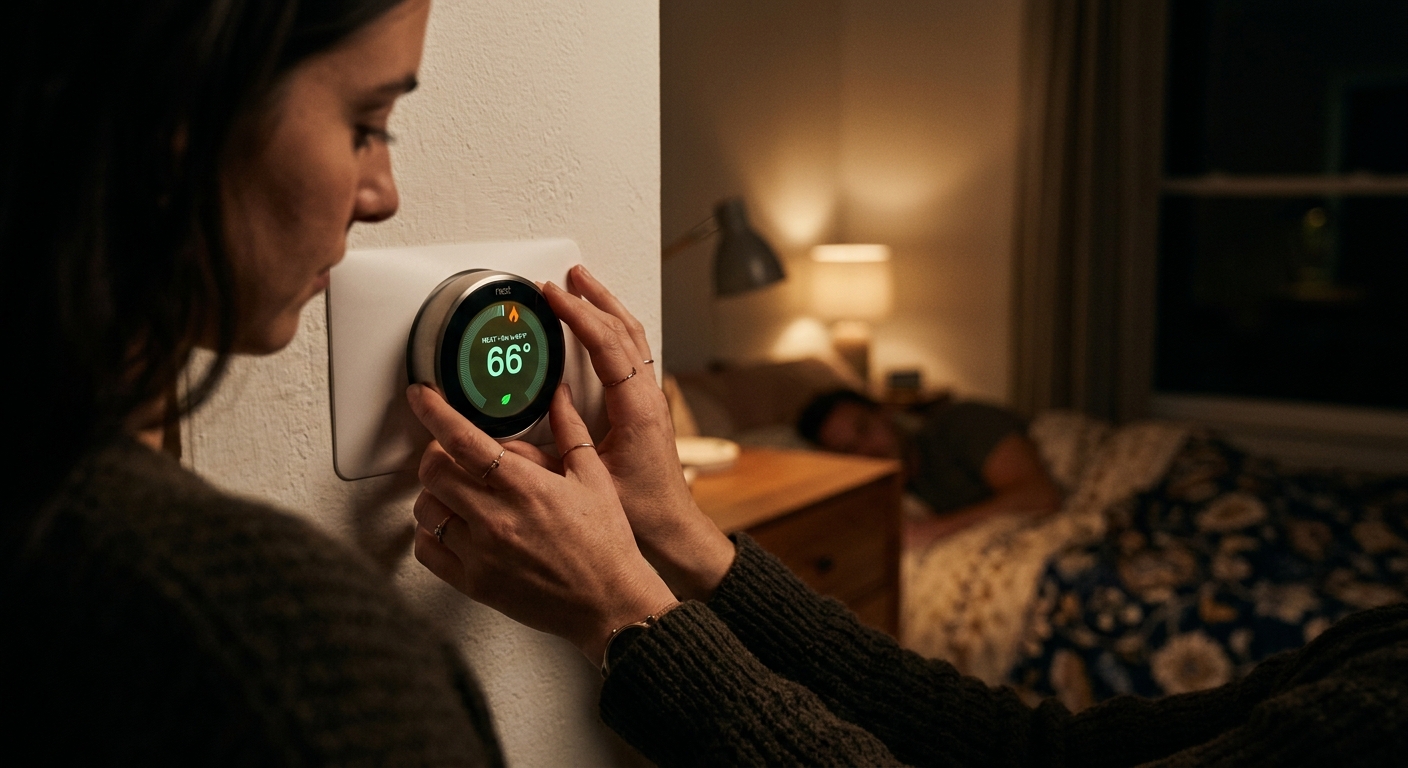
Every night, while you drift off to sleep, your thermostat is probably working harder than it needs to. Most households keep their home at the same temperature around the clock, which means your HVAC system is conditioning air to a comfort level designed for an awake, active person, not someone tucked under blankets for 8 hours. That gap between what your thermostat is set to and what your body actually needs at night represents real money leaving your wallet every month.
The Department of Energy estimates that setting your thermostat back 7 to 10 degrees Fahrenheit for 8 hours a night can save up to 10% per year on heating and cooling costs. For the average U.S. household spending around $1,500 annually on energy, that is $150 back in your pocket just by adjusting a schedule you set once and never touch again. Better yet, sleeping in a slightly cooler room is actually better for your health, since the body naturally drops its core temperature during sleep.
This post covers exactly what your thermostat should be doing overnight versus what it is probably doing now, the building science behind why it matters, and step-by-step approaches ranging from a free 5-minute fix to a full smart thermostat upgrade that pays for itself in under two years.
What You’ll Need
Click on an item below to shop for the recommended items for this recipe on Amazon.
As an Amazon Associate, we earn from qualifying purchases.
How to Do It
- Go to your thermostat right now and note your current set temperature. Write it down so you know your baseline.
- In winter, lower the setpoint by 7 to 10 degrees Fahrenheit before bed. If you normally keep it at 70, set it to 62 to 63 degrees. In summer, raise the cooling setpoint by 7 to 10 degrees, from 74 up to 81 to 82 degrees.
- Set a phone alarm for 30 minutes before your normal wake-up time labeled ‘restore thermostat’ so you remember to return it to your daytime comfort temperature.
- Note on your first few nights whether you wake up feeling too cold or too warm, and adjust by 1 to 2 degrees in the appropriate direction until you find your personal overnight sweet spot.
- Track your next utility bill against the same month last year to see your savings. Most households notice a difference within one full billing cycle.
- Check whether your current thermostat is programmable by looking for a ‘Schedule,’ ‘Program,’ or ‘Set’ button. If it is not programmable, purchase a 7-day programmable thermostat for $25 to $60 at any hardware store. Installation requires only a screwdriver and takes about 30 minutes for most forced-air systems.
- Before changing any wiring, take a photo of your existing thermostat wiring with your phone. Label each wire with a piece of tape and marker matching its terminal letter before disconnecting anything.
- Enter your thermostat’s scheduling mode. Program four daily periods: Wake (your normal wake time at comfort temperature), Leave (when you leave for work, set back 7 to 10 degrees), Return (30 minutes before you arrive home, restore comfort temperature), and Sleep (30 minutes before bedtime, set back 7 to 10 degrees).
- For the Sleep period specifically, set heating to 62 to 65 degrees Fahrenheit in winter and cooling to 76 to 78 degrees Fahrenheit in summer. These ranges balance efficiency with humidity control and comfort.
- Set the Wake period to begin 30 minutes before your actual alarm time. This gives your system a recovery ramp so the home is already at your desired temperature when you get out of bed, eliminating the most common complaint about programmable thermostats.
- After one full week, review your comfort and check for any times the house felt too hot or cold. Fine-tune setpoints in 1-degree increments rather than making large changes all at once.
- Check your utility provider’s rebate portal before purchasing. Many utilities offer $50 to $100 rebates on ENERGY STAR certified smart thermostats, bringing the effective cost to $50 to $150.
- Verify compatibility at the thermostat manufacturer’s website using your existing wiring configuration. Most central forced-air systems with a C-wire (common wire) are compatible. If you lack a C-wire, Ecobee includes an adapter kit in the box.
- Turn off power to your HVAC system at the breaker before removing the old thermostat. Take a clear photo of all wire connections before disconnecting anything.
- Install the new thermostat base plate, connect wires to the labeled terminals, and snap on the display unit. Restore power and follow the on-screen setup wizard, which typically takes 10 to 15 minutes.
- During setup, enable the smart or adaptive learning mode and input your preferred sleep temperature (65 degrees for heating, 76 to 78 degrees for cooling). The device will refine its schedule over the first 1 to 2 weeks by observing when you adjust settings.
- Download the companion app and enable geofencing if available. This lets the thermostat detect when everyone has left home and shift to an energy-saving mode automatically, adding savings beyond just the overnight schedule.
- After 30 days, review the energy history report in the app. Most smart thermostats display estimated savings versus a baseline, giving you concrete feedback to optimize your settings further.
Why It Works: The Benefits
A consistent 7 to 10 degree overnight setback saves up to 10% on total annual heating and cooling costs, according to DOE data. On a $1,500 annual energy bill, that is $100 to $150 per year returned to your pocket for a one-time 5-minute setup.
Research published in the journal Sleep Medicine Reviews links cooler sleeping environments (65 to 68 degrees Fahrenheit) to faster sleep onset and deeper REM cycles. You wake more rested without buying anything new.
Fewer overnight run cycles means less compressor starts and fewer burner ignitions per year. Reducing annual runtime by even 10% can extend the life of an HVAC system and delay costly repairs or replacement.
A 10% reduction in HVAC energy use for an average home eliminates roughly 500 to 800 pounds of CO2 emissions per year, equivalent to driving about 500 fewer miles in a typical passenger vehicle.
Running the AC on a smart overnight schedule prevents late-night humidity spikes better than leaving a static high setpoint, keeping indoor relative humidity in the comfortable 40 to 55% range without additional equipment.
💰 Savings Impact by Action
A 7 to 10 degree setback for 8 hours per night saves up to 10% annually on total heating and cooling costs, per DOE estimates.
Smart thermostats save an additional 5 to 8% beyond manual schedules by adapting to occupancy patterns and outdoor temperature forecasts.
Properly timed recovery periods prevent emergency heat or full-capacity AC runs that can erase up to 5% of your overnight savings.
Using a ceiling fan in the bedroom allows a 2 to 3 degree higher overnight cooling setpoint, reducing cooling load by an additional 4% in summer.
🏠 Key Concepts Explained
The Science Behind It
The core physics at work here is Fourier’s Law of heat transfer: the rate at which heat moves through a material (your walls, ceiling, windows) is directly proportional to the temperature difference across it. In winter, a home kept at 70 degrees Fahrenheit when it is 30 degrees outside has a 40-degree gradient driving heat loss through every surface. Drop the indoor temperature to 62 degrees overnight and that gradient shrinks to 32 degrees, reducing the rate of heat loss by 20%. Your furnace runs proportionally less to compensate, and your energy meter slows down.
In summer, the same principle works in reverse. Raising your overnight cooling setpoint from 74 to 80 degrees reduces the temperature gap between your cool interior and a hot attic or sunbaked exterior wall. Less gradient means less heat intrusion, which means your compressor cycles on less frequently. The compressor is the most electricity-hungry component in your HVAC system, often drawing 2 to 5 kilowatts per hour of operation, so every avoided cycle delivers real measurable savings.
There is also a latent heat component in summer climates. Air conditioners remove both sensible heat (temperature) and latent heat (moisture). When your AC runs less at night, some moisture can re-enter the air. This is why the upper limit for a summer overnight setback is around 78 to 80 degrees Fahrenheit, not higher. Pushing past that threshold in humid climates risks indoor humidity climbing above 60%, which promotes mold growth and creates the clammy discomfort that makes you reach for the thermostat at 2 a.m. anyway.
Frequently Asked Questions
▼ Why is my house still cold in the morning even with a recovery period set?
Your recovery start time is likely too close to your wake time, especially in very cold weather or an older home. Extend the recovery window to 45 to 60 minutes before you wake. Also check that your overnight setback is not more than 10 degrees, since extreme setbacks require longer recovery times and can cause your system to run continuously at full capacity, which reduces efficiency rather than improving it.
▼ Can renters set up overnight thermostat schedules without landlord permission?
Yes, in most cases. If the thermostat is already programmable, you can set a schedule without any physical modification to the unit. If you want to replace a non-programmable thermostat with a smart model, ask your landlord first, since the thermostat is typically part of the rental unit. Many landlords agree because a smart thermostat protects against pipes freezing and often reduces utility costs they may be paying. Offer to restore the original thermostat when you leave.
▼ How long until I actually see savings on my bill?
Most homeowners see a measurable difference on the first full billing cycle after implementing overnight setbacks, typically 4 to 6 weeks depending on your billing period. For the clearest comparison, look at the same calendar month from the prior year rather than the previous month, since seasonal weather variation can mask the savings. A programmable schedule saving 10% on a $150 monthly HVAC bill will reduce that bill by about $15, which is visible but modest in any single month.
▼ My smart thermostat is not learning my schedule. What am I doing wrong?
Smart thermostat learning features require you to manually adjust the temperature at least 4 to 6 times at consistent times before the algorithm has enough data to predict your preferences. If you set it up and never touch it, it has nothing to learn from. Spend the first two weeks actively adjusting the thermostat whenever you feel too warm or cool, using the physical controls on the device rather than the app, since some models prioritize in-person adjustments as stronger learning signals.
▼ Is it bad to set back the thermostat in a home with a heat pump?
Setbacks are fine for heat pumps, but large setbacks of more than 5 to 6 degrees in cold weather can trigger the emergency or auxiliary heat strip to kick in during recovery. Heat strips use 2 to 3 times more electricity than normal heat pump operation, which can erase your overnight savings. Limit overnight setbacks to 4 to 5 degrees if you have a heat pump and use a thermostat specifically designed for heat pump systems to prevent unnecessary auxiliary heat activation.
Quick Tips
- Use a 7-day schedule rather than a 5-2 weekday-weekend split if your weekend sleep schedule differs by more than 90 minutes from your weekday schedule. Mismatched schedules are the top reason people override their programs and lose savings.
- In shoulder seasons (spring and fall), consider using a setback of only 4 to 5 degrees rather than the full 7 to 10 degrees, since outdoor temperatures are mild enough that your system may not run at all overnight anyway.
- If you use a ceiling fan in the bedroom, you can tolerate a 2 to 3 degree higher overnight cooling setpoint with the same perceived comfort, since moving air increases evaporative cooling from your skin. This extends your setback range and increases savings.
- Layer bedding strategically in winter instead of raising the thermostat. A quality down or synthetic comforter rated for your climate zone costs $60 to $120 and allows you to sleep comfortably at 64 degrees, paying for itself in thermostat savings within one heating season.
Variations for Your Situation
- Apartment or Rental: If you cannot replace the thermostat, use the manual setback approach every night and set a phone alarm for recovery. If the landlord allows it, suggest replacing the thermostat with a smart model and offer to cover the cost since you will recoup it in lower utility bills within one season. Portable smart plugs with temperature sensors connected to a smart speaker can also control window AC units or space heaters if central HVAC is landlord-controlled.
- Tight Budget (under $50): Skip hardware entirely and use the manual setback method with a dedicated phone alarm. If you want automation without the full smart thermostat cost, basic 7-day programmable thermostats are available for $25 to $35 at hardware stores and deliver 80% of the savings of a smart thermostat with no subscription fees or Wi-Fi required. Focus on nailing the two most impactful programs: Sleep setback and Wake recovery.
- Older Home (pre-1980): Older homes with minimal attic insulation and single-pane windows lose heat significantly faster overnight, which means recovery times must be longer and setback depths should be conservative (5 to 7 degrees rather than the full 10). Before investing in a smart thermostat, confirm that air sealing and attic insulation are adequate, since a drafty home will struggle to maintain any set temperature regardless of thermostat sophistication. An energy audit costing $100 to $400 can identify the biggest losses and prioritize your investments.