Your electric meter is one of the most useful tools in your home, and almost nobody uses it. While you wait for a monthly bill to tell you what went wrong, your meter is quietly logging every kilowatt-hour your air conditioner burns in real time. Learning to read it takes about five minutes, and the payoff is immediate awareness of exactly how much your cooling habits are costing you.
The average central AC system consumes between 3,000 and 5,000 watts per hour of runtime. At the national average electricity rate of roughly $0.16 per kilowatt-hour, that means your system can burn through $1.50 to $4.00 every hour it runs on a hot summer day. Multiply that across an eight-hour afternoon, and you can see how a single week of poor thermostat habits quietly adds $50 to $100 to your bill.
This post walks you through exactly how to read your analog and digital electric meters, how to isolate your AC’s specific consumption, how to calculate a daily and monthly cost estimate, and how to use that data to pinpoint waste and verify that upgrades or behavior changes are actually paying off.
What You’ll Need
Click on an item below to shop for the recommended items for this recipe on Amazon.
As an Amazon Associate, we earn from qualifying purchases.
How to Do It
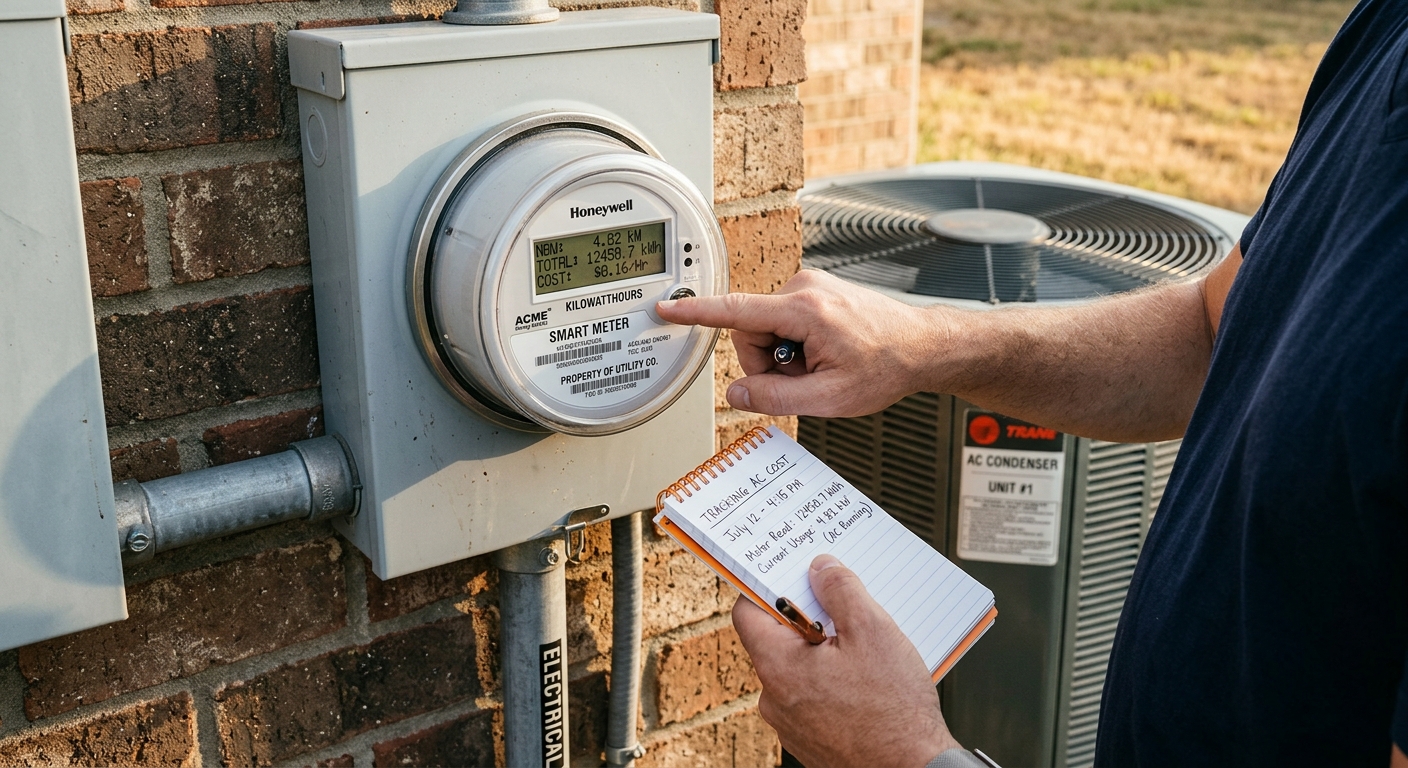
- Locate your electric meter, usually mounted on an exterior wall near your electrical panel or at the property line. Look for either a spinning analog dial face with five numbered dials or a digital LCD display showing a number with five or six digits.
- On a digital meter, record the full number displayed, including leading zeros. On an analog meter, read each dial from left to right. When the pointer falls between two numbers, record the lower number. If it falls directly on a number, check the dial to the right: if that dial has passed zero, record the number; if not, record the number below it.
- Turn your AC thermostat completely off so only baseline loads remain running. Wait 60 minutes, then take a second meter reading. Subtract the first reading from the second. This difference in kWh is your home’s baseline hourly consumption from everything except the AC.
- Turn your AC back on and set it to a temperature that will make it run continuously for one hour. After 60 minutes, take a third reading. Subtract the second reading from the third. This kWh figure represents one full hour of AC operation plus baseline. Subtract your baseline figure to get AC-only hourly consumption.
- Multiply your AC-only hourly kWh by your utility’s per-kWh rate, then multiply by your estimated average daily runtime in hours. This gives you an estimated daily AC cost. Multiply by 30 for a monthly projection. Compare this number to your actual bill to gauge accuracy.
- Repeat this two-reading process on the same day each week, ideally at the same time of day, to track trends as outdoor temperatures change across the summer season.
- Log in to your utility’s online account portal and navigate to the energy usage or usage history section. Most modern utilities with smart meters offer an option to view hourly or 15-minute interval data. Download or export the last 30 days as a spreadsheet file if the option is available.
- In the spreadsheet, identify your hottest recent days by cross-referencing with local weather history (Weather.gov or Weather Underground provide free historical data by zip code). On those hot days, look for the hours with the highest kWh consumption. This is your peak AC demand window.
- Calculate your average daily kWh consumption over the past 30 days and subtract your daily baseline load determined from the manual method above. The remainder is your average daily AC-attributed consumption. Multiply by your rate to get average daily AC cost.
- For central AC circuits that are too high-voltage for standard plug-in monitors, use a clamp-style energy monitor such as a Sense Home Energy Monitor or an Emporia Vue Gen 2, which installs in your main electrical panel and separates AC consumption from total household usage automatically. Installation requires comfort working in your breaker panel and takes about 45 minutes.
- For window AC units or portable units on standard 120V circuits, plug a device such as a Kill A Watt P4400 directly between the unit and the outlet. The monitor will display real-time wattage, cumulative kWh, and allow you to calculate cost by entering your rate per kWh.
- Review your interval data weekly during peak cooling season, comparing kWh consumption on similar-temperature days before and after any changes you make, such as adding weather stripping, adjusting thermostat schedules, or cleaning filters. A meaningful improvement will show up as a 10 to 25% drop in consumption on equivalent weather days.
- Purchase a whole-home energy monitor with device detection capability such as the Sense Home Energy Monitor ($299) or Emporia Vue Gen 2 ($70 plus CT sensors). These devices use current transformers that clamp around your main service wires inside the panel without requiring you to cut any wires.
- Turn off the main breaker to your electrical panel before opening it. Clamp the current transformer sensors around the two main service legs entering the panel, following the manufacturer’s diagram carefully. Mount the monitor unit itself on the interior panel door or adjacent wall using the included hardware.
- Restore main power and connect the monitor to your home Wi-Fi network through its companion app. The app will begin logging total household consumption immediately in real time.
- Allow the monitor two to four weeks to learn your home’s electrical signature. Sense-type monitors use machine learning to identify individual appliances including your AC compressor, air handler fan, and auxiliary heat strips if present, and will begin reporting them as separate line items in the app.
- Use the app’s device-specific reports to pull exact runtime hours and kWh consumption for your AC system by day, week, and month. Set up cost alerts to notify you when daily spending exceeds a threshold you define, such as $4.00 per day for cooling.
- Use the historical comparison tool in the app to measure the before-and-after impact of any efficiency improvements such as new insulation, duct sealing, or a programmable thermostat. Export monthly reports to document savings for any rebate applications with your utility.
Why It Works: The Benefits
Rather than waiting 30 days for a surprise bill, meter readings give you a daily cost figure. Homeowners who track daily often identify a single behavioral change, like raising the thermostat from 72 to 76 degrees F, that saves $0.80 to $1.50 per day, which adds up to $24 to $45 per month.
After adding insulation, sealing ducts, or installing a new smart thermostat, meter readings taken before and after let you calculate actual savings rather than relying on estimates. This is the only reliable way to confirm a $400 upgrade is delivering its promised 15 to 20% reduction.
A refrigerant leak, dirty coil, or failing capacitor can cause your AC to run 20 to 40% longer to achieve the same cooling, which shows up immediately as a jump in daily kWh consumption. Catching this early can prevent a $150 service call from turning into a $1,200 compressor replacement.
Meter readings let you test different setback strategies and measure their effect within 24 to 48 hours. The DOE estimates that setting your thermostat 7 to 10 degrees F higher for eight hours a day saves about 10% annually on cooling, and your meter lets you confirm that figure in your specific home.
Air handlers, condensate pumps, and smart thermostat control boards draw small amounts of power even when the compressor is off. Meter-based tracking helps you account for these secondary loads, which typically add 50 to 150 kWh per season and appear as a persistent elevated baseline on hot days.
💰 Savings Impact by Action
Raising your thermostat 7 to 10 degrees F for eight hours daily reduces annual cooling costs by approximately 10%, as confirmed by DOE data.
On time-of-use rate plans, shifting AC-intensive hours to before 2 PM or after 9 PM can reduce your effective cooling cost per kWh by up to 30 to 50%.
Catching a refrigerant leak or dirty coil early via elevated meter readings can prevent a 20 to 40% runtime increase that would otherwise inflate your seasonal bill.
Homeowners who actively monitor daily energy use reduce consumption by an average of 10 to 15% through small behavioral adjustments, according to studies on real-time feedback displays.
Using meter data to confirm that an insulation or duct-sealing upgrade is performing as expected helps homeowners avoid leaving efficiency gains unrealized, which can represent 15 to 20% of cooling costs.
🏠 Key Concepts Explained
The Science Behind It
Your electric meter works by measuring the rate at which electrical charge flows through your home’s service wires. Older analog meters use a spinning aluminum disc whose rotation speed is proportional to power draw. The disc drives a series of numbered dials through a gear train, and the cumulative dial readings represent total energy consumed in kilowatt-hours. Modern digital and smart meters accomplish the same measurement electronically using current transformers and voltage sensors, but the underlying physics is identical: energy equals power multiplied by time, measured in watt-hours.
When you isolate your AC’s consumption by taking before-and-after readings with the system on versus off, you are applying a simple controlled experiment. The key variable is whether the compressor is running. A central air conditioner’s compressor is typically the single largest electrical load in a home, drawing 2,000 to 5,000 watts depending on tonnage, compared to 100 to 800 watts for most other appliances. This large signal-to-noise ratio means even a simple manual meter reading can accurately attribute consumption to your AC within a reasonable margin of error.
Smart meters go further by recording consumption at 15-minute intervals, which aligns closely with a typical AC cycle length of 10 to 20 minutes. When your utility makes this interval data available through their portal, you gain the ability to see not just how much electricity you used but when, which makes it possible to correlate consumption spikes with outdoor temperature data and identify exactly which hours of the day are driving your bill. This is the same data that utility demand-response programs use to offer bill credits, and it is free for most homeowners to access right now.
Frequently Asked Questions
▼ My meter reading shows way more consumption than my AC should be using. What else could be the cause?
First verify your baseline by turning off the AC, then turning off every circuit breaker in your panel one at a time while watching the meter for a slowdown or change. Common hidden loads include electric water heaters, old chest freezers, pool pumps, and electric dryer heating elements. If your baseline load exceeds 1 to 1.5 kWh per hour with everything off except the fridge and a few lights, you have a significant phantom load worth hunting down.
▼ I have an analog dial meter and I keep getting confused reading it. Is there an easier way?
Take a clear photo of the meter face and zoom in on the dials. Read each dial from left to right, always choosing the lower of the two numbers the pointer is between. Then take a second photo one hour later and do the same. Subtract the first reading from the second to get hourly kWh. If the numbers still seem off, search for your specific meter model number, usually printed on the face, and look for a video demonstration online.
▼ My utility does not show hourly data online. How can I still track my AC usage?
Call your utility’s customer service line and ask if they have a smart meter installed at your address and if interval data access is available through a different portal or upon request. Some utilities provide this data only if you specifically ask. If they genuinely do not offer it, the manual meter reading method or a plug-in Kill A Watt monitor for window units are your best options. A whole-home monitor like the Emporia Vue is also fully independent of your utility.
▼ How do I account for the fact that some days are hotter than others when comparing readings?
Use cooling degree days (CDDs), which are available free from NOAA and Weather Underground. A cooling degree day represents one degree of average daily temperature above 65 degrees F. Divide your daily kWh by that day’s CDD to get a normalized consumption figure. Comparing this normalized number week over week removes weather variability so you can see whether your AC is actually becoming more or less efficient over time.
▼ Can renters use any of these methods without landlord permission?
Yes. Reading your electric meter is always permitted since you are simply reading an external display, not modifying anything. Plug-in monitors like the Kill A Watt require no installation and are fully renter-safe for window or portable AC units. Accessing your smart meter data through the utility portal only requires your account login. The only method that requires permission is installing a whole-home monitor inside the electrical panel, which you should discuss with your landlord or building manager first.
Quick Tips
- Write down your meter reading every morning at the same time for one week before making any changes. This gives you a reliable baseline to compare against after you take action.
- Check your utility bill for the specific rate tiers or time-of-use windows that apply to your account. Running your AC hard during off-peak hours, typically before 2 PM and after 9 PM in most markets, can reduce your effective cost per kWh by 30 to 50% on time-of-use plans.
- Cross-reference your daily kWh readings with that day’s outdoor high temperature using a weather app. Over two weeks you will see a clear relationship, and any day that falls well above the trend line signals an equipment inefficiency worth investigating.
- If you have a smart thermostat with an energy report feature, compare its runtime data to your meter-derived consumption estimates as a cross-check. Large discrepancies, more than 20%, can indicate refrigerant issues, dirty coils, or duct leaks that are forcing longer runtimes than the thermostat is logging.
Variations for Your Situation
- Apartment/Rental: Renters with window or portable AC units can use a Kill A Watt P4400 ($25 to $30 at hardware stores) plugged directly into their outlet to get exact wattage, cumulative kWh, and monthly cost projections without any landlord involvement. Pair this with your utility’s online interval data if your apartment has its own meter to track total consumption. If your electric bill is included in rent and you cannot access interval data, use the Kill A Watt to estimate what your unit costs and use that as leverage to negotiate a more efficient unit with your landlord.
- Tight Budget (under $50): Skip any purchased hardware entirely and use the free manual meter reading method described in Approach 1. The only cost is five minutes of your time twice a day. Supplement this with your utility’s free online portal data. If your utility offers a free home energy audit, schedule one and ask the auditor to pull your interval data history and interpret it with you on-site at no cost.
- Older Home (pre-1980): Homes built before 1980 often have less insulation, single-pane windows, and significant air leakage, meaning your AC runtime and meter readings will be substantially higher than newer home benchmarks. When interpreting your data, compare your kWh per cooling degree day against the DOE’s regional benchmarks for older homes rather than current Energy Star standards. Prioritize using your meter readings to identify the worst days and correlate them with whether doors, windows, or attic hatches were opened, since even small air leaks have an outsized impact in older, less-tight construction.