Your air conditioner has more control than you think, and most of it is sitting untouched. The average American household spends about $500 per year on cooling, yet a surprising portion of that cost comes not from a failing system, but from default settings that were never optimized for real-world living. Fan mode, temperature setbacks, humidity targets, filter change intervals, and airflow direction are five settings that can make or break your comfort and your energy bill.
The good news is that none of these changes require a technician, special tools, or a big budget. Most take under five minutes and pay back immediately on your next utility bill. Whether you have a basic window unit, a central forced-air system, or a smart thermostat, the same principles apply: small adjustments to how your system runs add up to significant savings over a cooling season.
This post walks you through each of the five settings, explains why the factory default is often wrong for your home, and gives you a clear action plan for both a quick 15-minute fix and a more thorough DIY tune-up. Real numbers, real steps, and results you can see on your next electric bill.
What You’ll Need
Click on an item below to shop for the recommended items for this recipe on Amazon.
As an Amazon Associate, we earn from qualifying purchases.
How to Do It
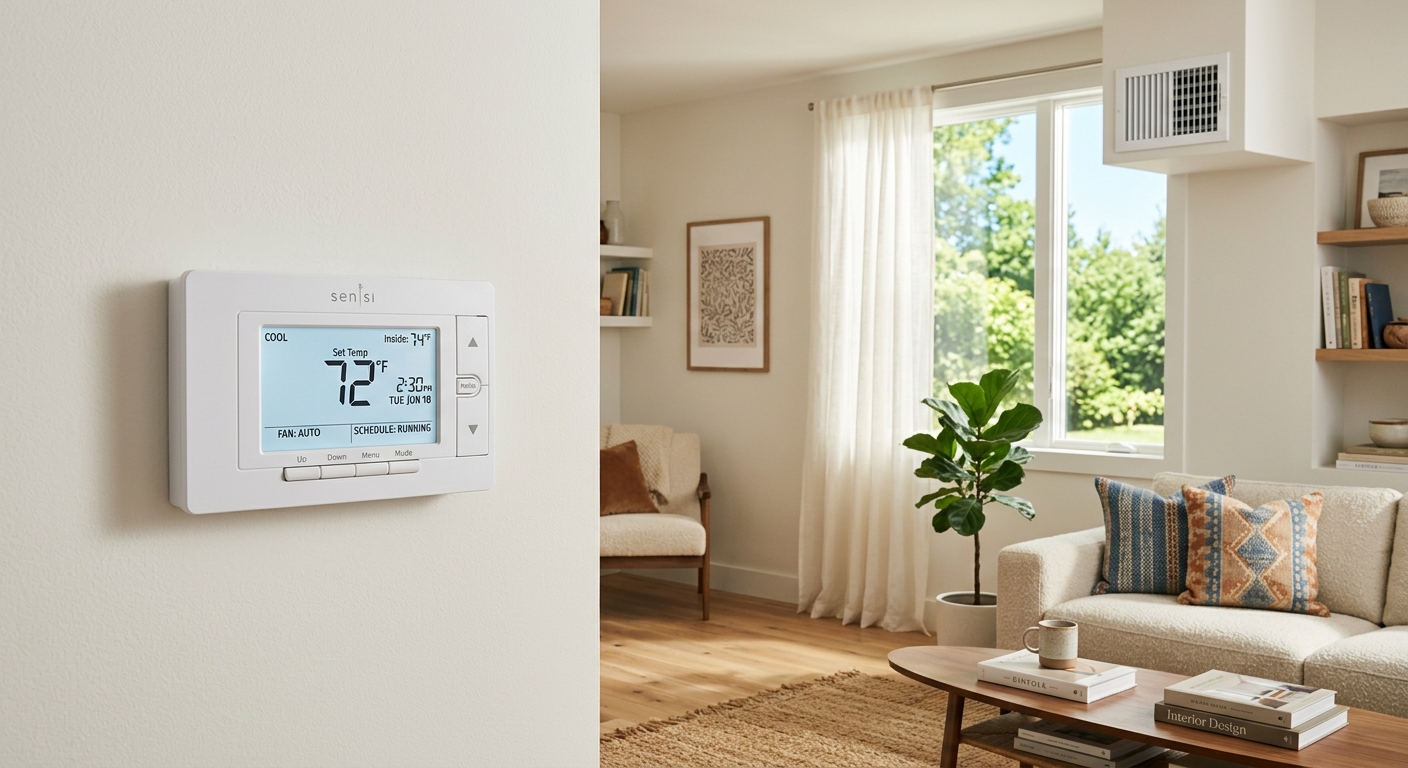
- Set your fan mode to AUTO, not ON. Find the fan switch on your thermostat (usually labeled FAN: AUTO / ON) and switch it to AUTO. This alone can reduce humidity by 5 to 10% and cut fan electricity use by up to $50 per season.
- Raise the thermostat setpoint to 78 degrees F when home and 85 to 88 degrees F when away for more than 4 hours. If you have a programmable thermostat, set a schedule now. If manual, make it a habit before leaving the house.
- Redirect supply vent louvers upward (toward the ceiling) in any room that feels stuffy or uneven. Use the adjustable fins on floor or wall registers and angle them up at roughly 45 degrees.
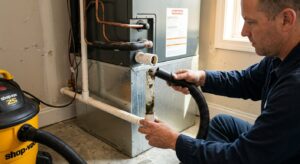
- Check your air filter by pulling it out and holding it up to a light source. If you cannot see light through it, note the size printed on the frame and plan to replace it within the next 48 hours.
- Locate your thermostat’s cooling minimum setting and confirm it is set no lower than 68 degrees F. On most thermostats this is in the settings or limits menu. Lower settings risk coil freeze and compressor damage.
- Replace the air filter with a MERV 8 to 11 rated pleated filter matching your existing filter size. Slide it in with the airflow arrow pointing toward the air handler. Set a recurring reminder every 60 to 90 days to check it again.
- If you have a programmable or smart thermostat, create a full weekly cooling schedule: 78 degrees F when home and awake, 75 degrees F for sleeping (many people sleep better slightly cooler), and 85 degrees F when away. Save and confirm the schedule activates.
- Clean the return air grille by vacuuming the fins and wiping with a damp cloth. A clogged return grille restricts airflow just as much as a dirty filter and is often overlooked.
- Go room by room and adjust all supply vent louvers for upward airflow in summer. Close vents partially (not fully) in rarely used rooms to redirect airflow to occupied spaces, reducing system demand by 5 to 10%.
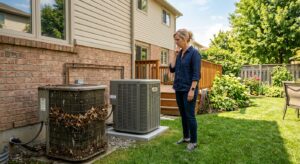
- Check the outdoor condenser unit. Clear any leaves, mulch, or debris from within 2 feet of the unit. Gently rinse the fins with a garden hose from the inside out if visibly dirty. A clean condenser can improve system efficiency by 5 to 10%.
- Review your thermostat for a humidity target setting. If available, set the target to 45 to 50% relative humidity. The system will run the compressor slightly longer per cycle to dehumidify, but will cycle less often overall, saving net energy.
Why It Works: The Benefits
Combining proper temperature setbacks, AUTO fan mode, and a clean filter can reduce cooling energy use by 20 to 35%, translating to $100 to $175 in savings over a typical cooling season for an average U.S. home.
Redirecting vent airflow upward and targeting 40 to 50% indoor humidity eliminates the hot-and-cold pockets that make some rooms uncomfortable, so you stop fighting the thermostat.
Replacing a clogged filter and avoiding sub-68-degree setpoints reduces strain on the compressor and blower motor, potentially adding 2 to 5 years to the life of a system that averages $5,000 to $12,000 to replace.
A clean MERV 8 to 11 filter captures pollen, dust, and mold spores that a dirty or low-grade filter misses, reducing allergen load in conditioned air by up to 85% compared to a standard fiberglass panel filter.
Switching from FAN ON to FAN AUTO allows the coil to drain properly between cycles, keeping indoor RH below the 60% threshold where mold and dust mites thrive, without buying a separate dehumidifier.
💰 Savings Impact by Action
Switching from ON to AUTO reduces fan electricity use and lowers indoor humidity, cutting cooling energy by up to 12% over a season.
Setting the thermostat 7 to 10 degrees higher while away saves approximately 10% annually on cooling costs per DOE data.
Replacing a clogged filter with a clean MERV 8 to 11 model restores proper airflow and can recover 5 to 15% of lost system efficiency.
Clearing debris and rinsing dirty condenser fins improves heat rejection, recovering up to 8% efficiency on neglected outdoor units.
Redirecting airflow upward and partially closing unused-room vents reduces overcooling and can cut room-level cooling load by 5 to 10%.
🏠 Key Concepts Explained
The Science Behind It
Your air conditioner is fundamentally a heat pump that moves heat from inside your home to outside, rather than generating cold air. The evaporator coil inside the air handler absorbs heat from indoor air as refrigerant evaporates inside it; that heat-laden refrigerant travels to the condenser outside, releases the heat, and cycles back. The efficiency of this process, measured as the Seasonal Energy Efficiency Ratio (SEER), depends heavily on the temperature difference between your indoor setpoint and the outdoor ambient temperature. The smaller that gap, the less work the compressor does per unit of cooling delivered.
Humidity plays a critical role because removing moisture from air requires additional energy, called the latent heat of vaporization. When you run your fan on ON continuously, air moves across the coil faster than moisture can drain, blowing collected condensation back into the living space and raising indoor humidity. Higher humidity raises the perceived temperature, tricking you into lowering the thermostat further and starting a costly feedback loop. Switching to AUTO fan mode breaks that loop by giving collected moisture time to drain into the condensate pan between cycles.
Filter resistance is a physical constraint on system airflow measured in inches of water column (static pressure). A clean MERV 8 filter adds about 0.1 inches of static pressure. A clogged filter can add 0.3 to 0.5 inches, forcing the blower motor into a higher-resistance operating point where it consumes more electricity while moving less air. Less airflow means less heat exchange at the coil, longer run times, and higher bills. Replacing a filter is the single highest return-on-investment maintenance action a homeowner can take, with a payback measured in days, not years.
Frequently Asked Questions
▼ Why is my AC still running all day even after I tried these fixes?
Continuous running usually means the system is undersized for the heat load, the home has significant air leaks or poor insulation, or there is a refrigerant charge problem. Check that all windows and exterior doors are sealed, confirm attic insulation is at least R-30, and if the unit still runs nonstop on days below 95 degrees F, call an HVAC technician to check refrigerant levels and system sizing.
▼ Can renters make these changes without landlord permission?
Yes. Adjusting thermostat settings and fan mode requires no physical modifications and is fully within a renter’s control. Replacing the air filter is also renter-appropriate and often the renter’s responsibility under lease terms. Cleaning the condenser or adjusting ductwork may require landlord approval, so check your lease and notify the landlord in writing if the system needs professional service.
▼ How long before I actually see savings on my electric bill?
Temperature setback and AUTO fan mode savings appear on your very next monthly bill, typically a 10 to 20% reduction versus the prior month under the same weather conditions. Filter replacement savings build over 30 to 60 days as airflow improves. Compare your bill to the same month from the prior year to account for weather variation.
▼ What if my home is older than 30 years and has a non-programmable thermostat?
A manual setback thermostat can still be used effectively by forming the habit of raising the setpoint to 85 degrees F before leaving home and at bedtime. For about $25 to $50, you can replace a non-programmable thermostat with a basic 7-day programmable model, which typically pays for itself in one cooling season. If the wiring is older two-wire low-voltage (common in pre-1980 homes), check compatibility before buying.
▼ My house still feels humid even with the fan on AUTO. What else can I do?
High humidity despite proper fan settings usually means the AC is oversized, cycling too quickly to adequately dehumidify, or the home has significant air infiltration bringing in outdoor moisture. Try raising the setpoint by 1 to 2 degrees to extend run cycles, seal visible gaps around windows and doors, and if the problem persists, consider a standalone dehumidifier rated for your square footage or have an HVAC contractor assess system sizing.
Quick Tips
- Use a $15 indoor thermometer with a humidity display to confirm your indoor RH is between 40 and 50% before adjusting any other settings.
- If your home has two stories, close upstairs supply vents by about 25% in summer to force more cold air to the lower level, where it naturally stratifies upward and cools more evenly.
- Write the filter replacement date directly on the filter frame with a marker so anyone in the household can check it without looking up records.
- On mild days when outdoor temps are below 75 degrees F, turn the system to FAN ONLY mode and open windows instead. This free cooling can offset one to two compressor-run days per week in shoulder seasons.
Variations for Your Situation
- Apartment/Rental: Renters with window or through-wall AC units have direct access to the unit’s own settings panel. Set the fan to AUTO or Energy Saver mode (most window units have this), clean the washable foam filter monthly by rinsing with warm water, and use a $20 smart plug with a scheduling app to prevent the unit from running while you are away. These steps alone can cut window unit costs by 15 to 25% with no landlord involvement.
- Tight Budget (under $50): Focus first on the zero-cost changes: fan mode to AUTO, thermostat setback to 85 degrees F when away, and vent louver adjustment. Then spend $8 to $15 on a pleated MERV 8 filter, which is the single highest-impact low-cost upgrade. Skip the smart thermostat for now and use your phone calendar to set reminders to adjust the thermostat manually when you leave and return.
- Older Home (pre-1980): Older homes typically have higher air infiltration rates (3 to 5 air changes per hour versus 0.5 to 1.5 in newer construction), meaning your AC fights a constant influx of hot, humid outdoor air. Prioritize weather stripping on exterior doors and rope caulk on leaky window frames before optimizing settings. A programmable thermostat upgrade is especially valuable here since manual habits are harder to maintain in homes where temperatures swing more dramatically between rooms.