A smart thermostat is one of the most talked-about home upgrades of the past decade, and for good reason. Models like the Google Nest, Ecobee, and Honeywell Home T9 promise serious energy savings with minimal effort. But there’s a catch: the savings only materialize if the thermostat is programmed correctly. Studies from the American Council for an Energy-Efficient Economy found that improperly programmed thermostats can actually increase energy use compared to a simple manual setback routine.
The core principle is straightforward. Every degree you set back your thermostat for 8 hours saves roughly 1% on your heating or cooling bill. Program four daily setback windows, aligned with when you sleep and when you’re away, and you can realistically save 10 to 15% on heating and another 10% on cooling each year. That translates to $150 to $300 annually for a typical U.S. home spending around $1,500 per year on energy.
This post walks you through the right way to build a thermostat schedule from scratch, explains the building science behind why setbacks work, and covers the smart features most homeowners ignore entirely. Whether you just unboxed a new device or have had one sitting on the wall for years with factory settings, you’ll leave with a concrete, optimized schedule you can dial in today.
What You’ll Need
Click on an item below to shop for the recommended items for this recipe on Amazon.
As an Amazon Associate, we earn from qualifying purchases.
How to Do It
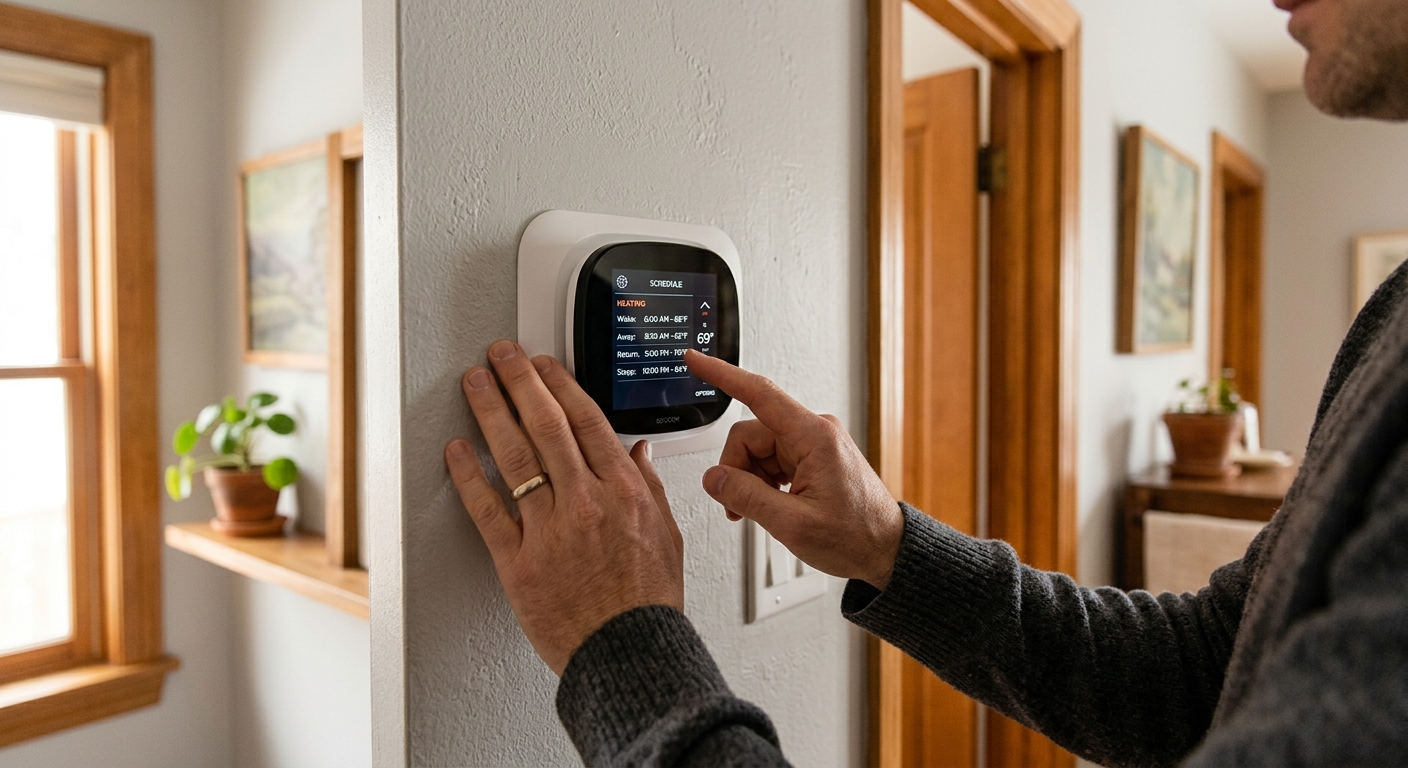
- Pull up your thermostat’s current schedule in the app or on the device. Note any periods where the temperature is set the same around the clock, which means you are paying to condition your home while asleep or away.
- Set a sleep setback starting 30 minutes after your typical bedtime. For heating season, drop the setpoint to 62 to 65 degrees Fahrenheit. For cooling season, raise it to 76 to 78 degrees. Set the recovery to begin 30 minutes before your typical wake time.
- Set an away setback for your typical work or errand hours. For heating, use 62 to 65 degrees. For cooling, use 78 to 80 degrees. Set the return pre-conditioning to begin 30 minutes before you typically arrive home.
- Enable geofencing in the app if your thermostat supports it. This overrides the fixed away schedule on irregular days so you never come home to an unconditioned house or waste energy conditioning an empty one.
- Check the energy usage history in your app after 2 billing cycles and compare runtime before and after. Most smart thermostat apps display estimated savings directly.
- Map your household’s actual schedule on paper before touching the thermostat. List wake time, leave time, return time, and bedtime for each day of the week. Weekday and weekend patterns are often different and most thermostats support separate weekend programming.
- Install or confirm your thermostat is wired with a C-wire for continuous power. Without a C-wire, smart thermostats may short-cycle or lose Wi-Fi, degrading performance. If you lack a C-wire, purchase a C-wire adapter kit (about $20) or use a thermostat model that supports power stealing such as the Nest.
- Program four daily time periods: wake, away, return, and sleep. Set wake temperature to your comfort setpoint (68 to 70 degrees in winter, 72 to 74 in summer). Set away and sleep setbacks 7 to 10 degrees from comfort setpoint in both directions.
- Enable your thermostat’s smart pre-conditioning or early start feature. On Nest, this is called Time-to-Temperature. On Ecobee, it is called Smart Recovery. This replaces the manual 30-minute buffer with an algorithm that learns your home’s recovery rate automatically.
- Connect your thermostat to your utility account if supported. Ecobee’s Home IQ and Nest’s Energy Dashboard provide runtime breakdowns by heating, cooling, and fan-only operation so you can identify waste. Enroll in a demand response program through your utility for additional $25 to $75 annual bill credits.
- Set temperature alerts and monthly energy reports in the app. Review the report after each billing cycle for the first 3 months and fine-tune setback temperatures or timing if the system is running more than 12 to 14 hours per day in mild weather.
- Purchase a smart thermostat system that supports remote room sensors, such as the Ecobee SmartThermostat with SmartSensors or the Honeywell Home T9 with remote sensors. Each sensor costs $35 to $50 and covers one room.
- Place remote sensors in the rooms where comfort matters most, typically bedrooms and main living areas, not near heat sources, exterior walls, or supply registers. The thermostat averages temperature across active sensors to prevent over-conditioning one zone while ignoring another.
- Configure sensor participation schedules so bedroom sensors are active at night and living area sensors are active during the day. This ensures the system is conditioning the space you are actually using rather than chasing the temperature at the wall thermostat location.
- Have a licensed HVAC technician evaluate your duct system if certain rooms remain consistently 5 or more degrees off from the thermostat. Damper-based zoning systems like Keen smart vents or a fully ducted zone controller can direct airflow to where it is needed, reducing total runtime by up to 20%.
- After installation, use the app’s room-by-room temperature log to identify problem areas and adjust damper positions or sensor participation schedules accordingly. Recheck after one full heating and one full cooling season.
Why It Works: The Benefits
A properly programmed schedule with two daily setbacks of 7 to 10 degrees can reduce heating costs by 10 to 15% and cooling costs by 8 to 10% annually. For the average U.S. household spending $900 on heating and $400 on cooling per year, that is roughly $130 to $200 in real savings.
A mid-range smart thermostat costs $100 to $200 installed. With proper programming delivering $150 to $250 in annual savings, most homeowners break even within 6 to 18 months, after which the device pays for itself every year it runs.
A well-built schedule means your home is always at the right temperature when you need it, without anyone touching the thermostat. Pre-conditioning your home 30 minutes before wake time or return from work eliminates the cold-morning or hot-arrival experience most homeowners try to solve by overriding schedules.
Proper setbacks reduce total HVAC runtime by 10 to 20% annually. Fewer run cycles and shorter total operating hours extend equipment lifespan, potentially delaying a furnace or AC replacement by 2 to 4 years and saving thousands in equipment costs.
Many utilities offer $25 to $100 rebates for smart thermostat installation and additional savings through demand response programs, where you earn bill credits for allowing brief temperature adjustments during peak grid load periods. Ecobee and Nest both support these programs natively.
💰 Savings Impact by Action
A 7-degree overnight setback for 8 hours reduces heating or cooling energy use by approximately 7 to 8% per day.
Programming an away setback during a typical 8-hour workday can trim 10 to 12% from annual HVAC energy consumption.
Geofencing eliminates conditioning of empty homes on irregular schedule days, saving an additional 5 to 8% over fixed scheduling alone.
Adaptive pre-conditioning algorithms reduce unnecessary early-start runtime, cutting 5 to 6% of total HVAC operating hours versus a fixed buffer.
Enrolling in a utility demand response program delivers $25 to $75 in annual bill credits, equivalent to roughly 3 to 5% of a typical household’s HVAC spend.
🏠 Key Concepts Explained
The Science Behind It
The reason thermostat setbacks save energy comes down to a principle in thermodynamics called Newton’s Law of Cooling. Heat always flows from a warmer area to a cooler one, and the rate of that flow is proportional to the temperature difference between them. When your home is heated to 70 degrees on a 30-degree day, the 40-degree gap drives heat loss through your walls, windows, and roof continuously. Drop the interior to 62 degrees during a setback and that gap shrinks to 32 degrees, cutting your heat loss rate by 20% during those hours. Your furnace runs less because there is simply less heat escaping to replace.
A common misconception is that it takes more energy to reheat a cold home than you saved during the setback. This is false for almost every residential situation. The energy required to bring your home back to comfort temperature is always less than what you would have spent maintaining that temperature continuously through the setback period. The only exception is in extremely well-insulated homes with very high thermal mass, such as a passive house build, where the interior temperature barely drifts at all during a setback, making the exercise largely pointless. For the vast majority of American homes built before 2010, setbacks produce clear, measurable savings.
Smart thermostats improve on basic programmable models by integrating weather data and learned system performance to make scheduling more precise. Rather than adding a fixed 30-minute pre-conditioning buffer, a learning thermostat knows that your home takes 22 minutes to recover on a 40-degree morning but 47 minutes on a 15-degree morning. It adjusts the start time automatically, which prevents both the energy waste of starting too early and the comfort failure of starting too late. This adaptive behavior is responsible for the additional 5 to 8% savings learning thermostats demonstrate over conventional programmable models in independent field studies.
Frequently Asked Questions
▼ My smart thermostat is set to a schedule but the heating runs almost constantly. What is wrong?
Constant runtime usually means your home is losing heat faster than the system can add it. Check that your thermostat setpoint is realistic for outdoor conditions: on a 15-degree day, a system running 80 to 90% of the time is not unusual and does not indicate a problem. If runtime is excessive in mild weather (above 35 degrees), check air filter condition, look for a refrigerant or heat exchanger issue, and verify your home’s insulation. A smart thermostat cannot compensate for an undersized or malfunctioning system.
▼ I programmed setbacks but my energy bill did not go down. Why?
First, confirm the schedule is actually running by checking the app’s activity history. Many homeowners unknowingly leave the system in Hold or Permanent Hold mode, which ignores the schedule entirely. Second, check whether family members are overriding the schedule manually at the thermostat. Third, give it two full billing cycles before drawing conclusions, as one month is too short to distinguish scheduling savings from weather variation.
▼ Can renters program a smart thermostat without landlord permission?
If the landlord already installed a smart thermostat, you can adjust the schedule and settings freely without any modifications. If you want to install your own smart thermostat, you technically need landlord permission since you would be modifying a fixture. A practical middle ground is a plug-in smart thermostat adapter like the Mysa for electric baseboard heaters, which requires no wiring and is renter-safe.
▼ How long before I see the savings show up on my actual utility bill?
Most homeowners see a measurable difference after one to two full billing cycles on the new schedule. Because billing cycles straddle your change date and weather varies month to month, compare the same calendar month from the prior year rather than the previous month for the cleanest comparison. Your thermostat app’s energy history is often a more immediate feedback tool than your utility bill.
▼ My thermostat has a learning feature. Should I still program a schedule manually?
Yes, for the first two to four weeks. Learning thermostats like the Nest learn from your manual adjustments, so programming a rough schedule from the start gives the algorithm a solid baseline to refine rather than starting from scratch. After a month of learning, you can let the algorithm take over, but always review its suggested schedule to make sure it has not learned bad habits like conditioning an empty house.
Quick Tips
- Use the 7-degree rule as your baseline: a 7-degree setback for 8 hours saves about 7% on that portion of your bill. Stack a sleep setback and an away setback and the savings compound quickly.
- Do not use setbacks if you have a heat pump in very cold climates. When the house temperature drops significantly, heat pumps can trigger expensive electric resistance backup heat during recovery, erasing the savings from the setback.
- Check your utility’s website for smart thermostat rebates before buying. Rebates of $25 to $100 are common and can cover 25 to 50% of the device cost, improving your payback period significantly.
- If your household schedule is irregular, geofencing beats a fixed schedule every time. Set your away mode to trigger when the last household member leaves and use geofencing rather than a clock for the return trigger.
Variations for Your Situation
- Apartment/Rental: If your unit uses electric baseboard or fan-coil heating, standard smart thermostats will not work. Instead, look at line-voltage smart thermostats such as the Mysa or Stelpro Ki, which install on individual baseboards and are compatible with most landlord situations. These cost $100 to $130 per unit and can save 10 to 15% per zone. For central HVAC controlled by a landlord thermostat, focus on portable smart plugs for space heaters and window AC units as a workaround.
- Tight Budget (under $50): You do not need a smart thermostat to capture most of the setback savings. A basic 7-day programmable thermostat costs $20 to $40 and can be programmed with the same 4-period daily schedule described above. The main sacrifice is geofencing and remote access, but a fixed schedule built around your typical week delivers 80 to 90% of the savings of a learning thermostat at a fraction of the cost.
- Older Home (pre-1980): Older homes typically have higher air infiltration rates, meaning the interior temperature drifts toward outdoor conditions faster during setbacks. This actually makes proper scheduling more important, not less, since the HVAC system is working harder in the first place. However, extend your pre-conditioning window to 45 to 60 minutes rather than 30 to account for slower recovery. Also verify you have a C-wire before purchasing a smart thermostat, as older wiring systems sometimes lack one.