Your gaming console might be the most expensive standby device in your living room. A PlayStation 5 in rest mode draws around 1.5 watts continuously, but the real problem is everything plugged in around it: the TV, soundbar, streaming stick, and gaming router all stay partially on waiting for a signal. Together, a typical gaming station can consume 30 to 50 watts around the clock, adding $40 to $80 per year in electricity costs for a setup that is technically off.
This is called phantom load or standby power, and gaming entertainment centers are one of the worst offenders in the modern home. According to the U.S. Department of Energy, standby power accounts for roughly 5 to 10% of a typical home’s electricity bill. A smart power strip solves this by cutting power to peripheral devices the moment your console powers down, instead of leaving everything in a constant low-power wait state.
In this guide, you will learn exactly how to configure a smart power strip setup for your gaming station, which devices to plug where, what equipment to buy, and how to calculate your actual savings. Whether you have 15 minutes or an afternoon, there is an approach here that fits your situation and budget.
What You’ll Need
Click on an item below to shop for the recommended items for this recipe on Amazon.
As an Amazon Associate, we earn from qualifying purchases.
How to Do It
- Purchase a current-sensing smart power strip rated for at least 15 amps with surge protection, such as the TrickleStar Advanced or Tripp Lite TLP808TTUSB. Look for one with at least 4 controlled outlets and 2 always-on outlets.
- Unplug all devices from your existing power strip or wall outlets. Take note of which devices you use only during gaming sessions (TV, soundbar, monitor, console accessories) versus devices that should stay on at all times (router, external drives you actively sync).
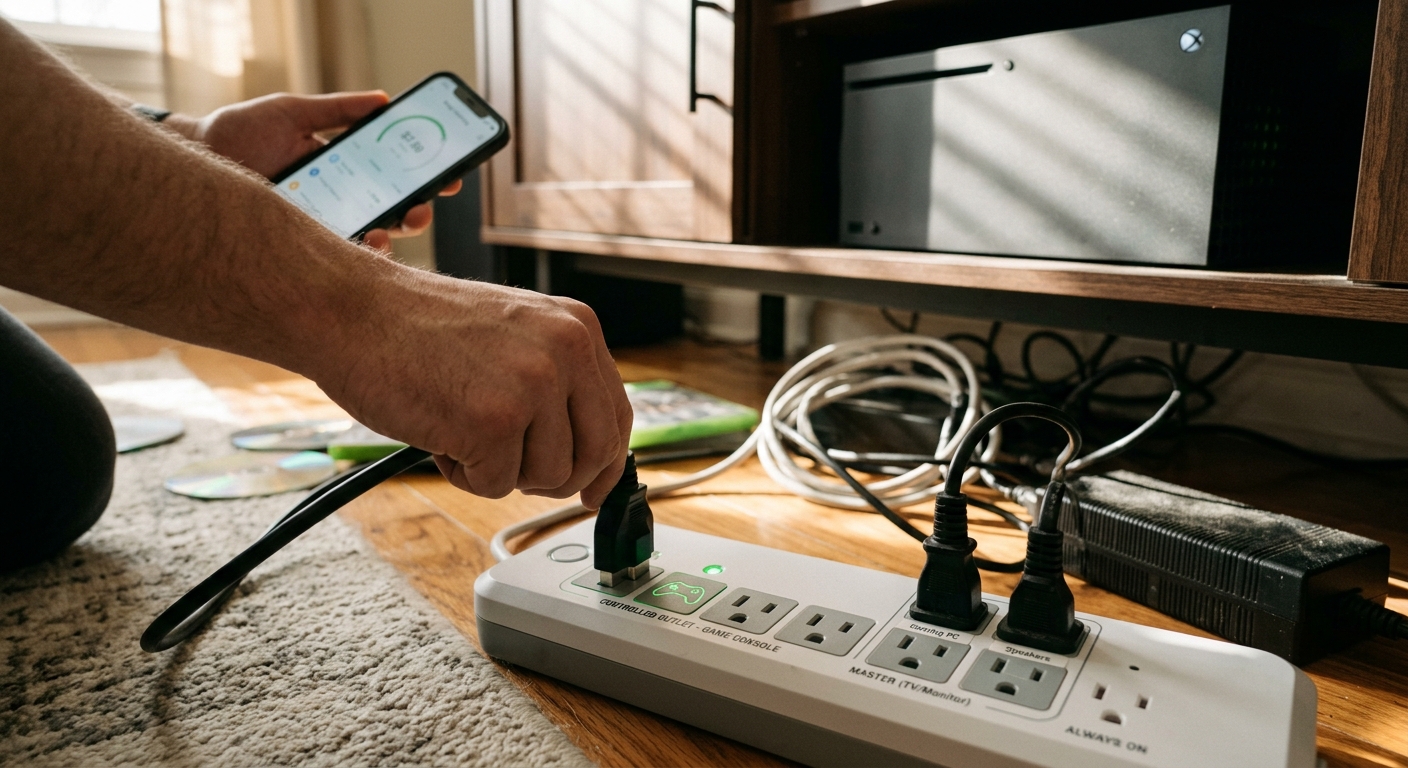
- Plug your gaming console into the designated control outlet on the smart strip, usually colored blue or labeled Control. This outlet monitors power draw to trigger the switching.
- Plug all session-only devices including your TV, soundbar, gaming headset charger, and display into the switched controlled outlets. Plug any always-on devices into the unswitched outlets.
- Power on your console and verify the controlled outlets activate. Then power off the console and confirm within 30 to 60 seconds that the TV and other switched devices lose power. If not, check the sensitivity dial and lower the threshold slightly.
- Use a plug-in energy monitor like a Kill A Watt meter for one week before and after to verify your actual savings and confirm the setup is working as intended.
- Purchase one Wi-Fi smart plug per major device group, such as a Kasa EP25 or Amazon Smart Plug, plus one smart power strip with Wi-Fi control for your main console cluster. Ensure each plug shows real-time wattage monitoring in its app.
- Download the corresponding app and connect each smart plug or strip to your home Wi-Fi network on the 2.4 GHz band. Create a room or group in the app called Gaming Station and add all the plugs in that zone.
- Plug your console into one smart plug so the app can read its wattage live. During active gaming the console will show 100 to 200 watts. In rest mode it will drop below 2 watts. Note these numbers for setting automations.
- Configure an automation or schedule in the app: if console wattage drops below 5 watts for 5 consecutive minutes, power off the group containing TV, soundbar, and display. This mimics the hardware sensing of a smart strip but gives you full app visibility.
- Set a morning wake schedule if desired, for example, allow the system to power on only between 3 PM and midnight on weekdays, preventing any accidental activation from firmware updates or auto-on behaviors during off-peak hours.
- Check the energy dashboard weekly for the first month to identify any unexpected draws and fine-tune your automation triggers. Many apps show monthly cost estimates you can compare month over month.
- Audit every device in the room using a Kill A Watt meter, recording standby draw and active draw for each one. Total up the standby wattage to establish your baseline and calculate annual cost using your local kWh rate.
- Map out a two-tier power plan: Tier 1 covers always-on devices such as the router and NAS drive. Tier 2 covers everything that runs only during gaming sessions. Draw this out before buying any equipment.
- Install a dedicated 20-amp outlet for your entertainment center if your current outlet is only 15 amps and your total active load exceeds 12 amps. This step requires a licensed electrician and a permit in most jurisdictions.
- Install a smart whole-room controller such as the Lutron Caseta or a Shelly 1PM in-wall relay on the dedicated circuit to manage Tier 2 loads from a single switch or voice command. This is a low-voltage relay, not a full rewire, but still requires comfort with residential electrical work.
- Connect your gaming console, TV, receiver, and display to the Tier 2 circuit through a high-joule surge protector rated at 2,500 joules or more. Connect network gear and always-on devices to Tier 1 on a separate outlet.
- Integrate with a home automation platform such as Apple HomeKit, Google Home, or Home Assistant to create scenes: Gaming Mode powers on only Tier 2 devices in the right sequence, while Sleep Mode kills all Tier 2 power and dims any LED accent lighting.
Why It Works: The Benefits
Eliminating standby draw from a typical gaming setup saves 25 to 40 kilowatt-hours per month, cutting roughly $3 to $6 off your bill each month depending on your local rate, which adds up to $36 to $72 per year.
Applying the same smart strip strategy to your home office and home theater can reduce total household standby losses by 5 to 10%, saving an additional $50 to $150 per year across all entertainment zones.
Cutting power completely when devices are not in use reduces cumulative heat stress inside electronics. Capacitors and power supplies last longer when not continuously energized, potentially adding years to your TV and audio equipment.
Quality smart strips include joule-rated surge protection of 1,000 to 2,500 joules, shielding consoles and TVs worth hundreds or thousands of dollars from power spikes that a standard power strip cannot stop.
Unlike manual power management, a properly configured smart strip automates everything. You turn your console on and off normally, and the strip handles the rest, making this one of the few energy upgrades that requires zero daily effort.
💰 Savings Impact by Action
Cutting phantom load from a full gaming station in standby for 20 hours per day removes up to 60% of the station’s total daily energy consumption.
Switching a PS5 or Xbox Series X from rest mode to full power-off reduces the console’s own standby draw by roughly 15% of its total annual energy budget.
Enabling automatic brightness adjustment and auto-off timers on a modern TV reduces its active and standby draw by approximately 10% without any visible picture quality change.
Adding a time-based schedule that cuts power to the gaming zone from midnight to 2 PM on weekdays eliminates accidental or firmware-triggered power draw during the 14 hours the room is unused.
🏠 Key Concepts Explained
The Science Behind It
Phantom load exists because modern electronics use internal power supplies that stay partially energized even in standby. This allows them to respond to remote controls, receive firmware updates, and resume quickly. Every watt drawn continuously for a year consumes 8.76 kilowatt-hours. A 40-watt standby load from a gaming setup running all year costs roughly $5.25 per month at the national average electricity rate of $0.15 per kWh. That is the energy equivalent of running a standard LED bulb nonstop for months with nothing to show for it.
A current-sensing smart strip works by measuring the real power flowing through the control outlet using a tiny current transformer, similar in principle to how a clamp meter works. When the monitored device crosses below the threshold wattage, the strip opens a relay switch on the controlled outlets, physically disconnecting them from the circuit. This is a mechanical break, not just a software signal, which means controlled devices draw zero watts, not even a fraction of a watt. This is meaningfully different from a smart plug that merely reduces power or sends a soft-off signal.
The 60% savings figure comes from comparing a gaming station’s total average energy consumption with and without standby elimination. In active use the setup draws what it draws regardless of the strip. But if the setup is in standby for 20 of 24 hours, and standby accounts for 35 to 50 watts of that idle load, eliminating that idle load removes the largest single energy cost component of the entire setup. The console itself during gaming sessions might draw 150 to 200 watts, but only for 2 to 4 hours. The math strongly favors cutting standby over trying to reduce active gaming power consumption.
Frequently Asked Questions
▼ My TV shuts off in the middle of gaming. Why does the smart strip keep triggering?
The current-sensing threshold is set too low, and the strip is interpreting a brief dip in console power draw as a shutdown. Find the sensitivity adjustment dial on the strip, usually on the side, and turn it up one or two notches to require a higher wattage before triggering. If your strip has no adjustment dial, try a model like the TrickleStar Advanced that offers a tunable threshold between 0 and 5 amps.
▼ How much will I actually save per month using a smart power strip?
Plug a Kill A Watt meter between your current setup and the wall outlet and let it run for 48 hours in your normal pattern of use. Multiply the kWh reading by 15 to project the month, then multiply by your utility rate. Most households see $3 to $7 per month in savings from one gaming station, with higher savings in homes where the TV is large or the soundbar is powerful.
▼ Will this prevent my console from downloading updates overnight?
Yes, if the console is on a switched outlet and powers off with the strip, background downloads will not happen. You have two options: move the console to an always-on outlet and keep only the TV and audio on switched outlets, which still saves the majority of standby power. Or schedule downloads manually during your normal gaming session so the console does not need to stay partially on overnight.
▼ Can renters use this without landlord permission?
Absolutely. A smart power strip simply replaces a standard power strip and requires no modifications to the apartment’s electrical system. There is nothing to install, no permits needed, and you take the strip with you when you move. This is one of the most renter-friendly energy upgrades available.
▼ My gaming setup is in two different rooms. Does one smart strip cover both?
A single smart strip only controls devices plugged into it, so for two separate rooms you would need two strips or a Wi-Fi smart plug system with app-based grouping. The Wi-Fi approach outlined in the DIY upgrade section is ideal for multi-room gaming setups because one app can control all devices across the home with coordinated schedules and automations.
Quick Tips
- Label each outlet on your smart strip with a piece of tape noting what is plugged in. This prevents accidentally moving a device to the wrong outlet type during cleaning or rearranging.
- If your smart strip false-triggers and shuts off devices while you are mid-game, raise the current-sensing threshold by one notch. Console power draw dips briefly during cut scenes or menu screens and can fool a strip set too sensitively.
- Check your electricity rate on your utility bill and multiply it by your measured standby wattage times 8,760 hours to calculate your exact annual savings before and after. This makes the payback period concrete rather than estimated.
- Pair your smart strip setup with your TV’s built-in eco mode or auto-off timer as a backup layer so the TV does not stay on if the strip fails to trigger for any reason.
Variations for Your Situation
- Apartment or Rental: This entire strategy is renter-safe since smart power strips require no installation or wall modifications. Buy a $30 current-sensing strip, plug it in exactly as described, and take it when you move. Renters with multiple gaming devices can also use individual Kasa or TP-Link smart plugs per device to build a flexible setup without any permanent changes.
- Tight Budget (under $50): A basic current-sensing smart strip like the Tripp Lite TLP808TTUSB costs $25 to $35 and delivers 80% of the savings of a premium model. Skip the Kill A Watt meter for now and instead watch your utility bill for two consecutive months after installation. Also enable the built-in eco shutdown timer on your TV, which is free and available in most TV settings menus under Energy or Eco.
- Older Home (pre-1980): Homes built before 1980 may have ungrounded two-prong outlets that are not compatible with the three-prong smart strips offering the best protection and sensing. Do not use an adapter cheater plug, as this bypasses the ground that makes surge protection effective. Instead, have an electrician install a GFCI outlet as a safe modern replacement for two-prong outlets, then use your smart strip normally. The upgrade typically costs $100 to $200 per outlet and is worth it for protecting expensive gaming equipment.